sound
why should you, the code artist, care about sound?
sound demands attention
sound communicates emotion
enhances realism & immersion
provides feedback during interaction
types of sound
musical
abstract
skeuomorphic/sfx/diegetic
sonic interaction design: key questions
-
what sound to make?
-
when to start & stop?
-
how high (or low)?
-
how loud?
sound lingo
pitch: high or low (measured in Hz) ranging from 40Hz (low bass rumble) to 20kHz (high-pitched buzz)
amplitude: AKA volume or loudness, usually ranging from 0.0 (silence) to 1.0 (full volume)
duration: long or short, measured in seconds (it’s just time!)
timbre: often called the “colour” or “quality” of a sound (e.g. piano & saxophone can play the same pitch, but have different timbre)
what/when/how high/how loud
timbre (i.e. what)
in computer music (and in p5.sound), there are two ways to make a sound:
-
synthesis (mathematically calculating the signal)
-
sampling (playback of recorded sound)
Synthesis
Sampling

control (i.e. when)
Lots of options:
direct control through an input device (e.g. keyboard)
time-based
scene-based (e.g. connected to events in the sketch)
random
pitch (i.e. how high/low)
different pitches give us music
pitch can also communicate other things e.g. size, mood
amplitude (i.e. how loud)
slow changes in loudness—build tension, think verse vs chorus
quicker changes in loudness—accents in music
difference between loudest & softest sound is called the dynamic range—make use of it!
interaction
connect sound input to action on the screen
connect keyboard/mouse to sounds
connect camera/accelerometer to sounds
can we think about this as a new musical instrument?
sound is different to graphics
when we say frame rate, what are we talking about?
what’s the p5 draw() loop frame rate? how would we find out?
what’s the normal sound frame rate?
44100Hz–96000Hz
44100 vs 60: that’s a huge difference (735x!)
making sound in p5
p5 has a sound library: it’s called p5.sound
note: there’s no draw() loop for sound to directly program frames of sound (it
would be too slow)
instead, p5.sound provides a bunch of sound “building blocks” (which are just objects!) which you need to create and modify.
You need to make sure the p5.sound library is loaded in your index.html
building blocks
sources produce sound: e.g., playing a sound file, “synthesising” a sine wave
processors process sounds: e.g., bass boost, reverb
sources: synthesis
p5.sound provides a
p5.Oscillator which creates a
basic sound signal—here’s a simple example sketch
let osc;

function setup() {
  osc = new p5.Oscillator();
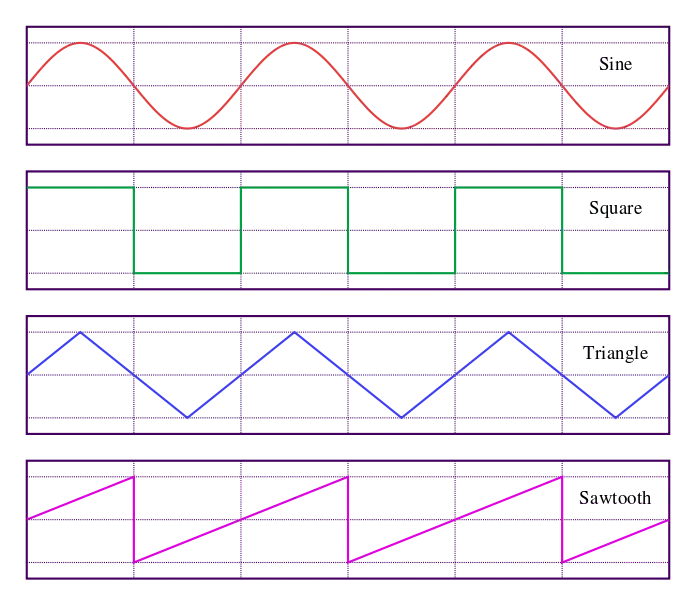
  osc.setType("sine"); // or "triangle", "sawtooth", "square"
  osc.start();
}

function draw() {
  osc.freq(1000*mouseY/height);
  osc.amp(mouseX/width);
}
basic synthesis parameters
// assign p5.Oscillator object to variable
osc = new p5.Oscillator();
remember the key sonic interaction design questions:
- what sound to make? use the
.setType()method - when to start & stop? start with
.start()method - how high/low? use the
.freq()method - how loud? use the
.amp()method
look at the reference for the full list of properties/methods
sources: sampling
loadSound() returns a
p5.SoundFile object useful for
playing pre-recorded sounds (e.g. mp3s, wav files, etc.)
let unilodgeSound;
function preload() {
  unilodgeSound = loadSound("assets/unilodge.mp3");
}

function setup() {
  unilodge.setVolume(0.5);
  unilodge.play();
}
basic sampling parameters
// assign p5.SoundFile object to variable
unilodgeSound = loadSound("assets/unilodge.mp3");- what sound to make? depends on the sound file
- when to start & stop? start with the
.play()method, stop when file ends (maybe) - how high/low? use the
.rate()method - how loud? use the
.setVolume()method
note the subtle differences: the p5.SoundFile object (sampling) has different
methods to the p5.Oscillator object (synthesis)
the preload() function
we’ve talked about setup() and draw()
but in some of the examples (again, especially the sound/image ones) there’s a
preload() function…
let’s check the reference
necessary because of the way the web browser works
talk
where should unilodgeSound.play() go?
function preload(){
  // here?
}

function setup(){
  // here?
}

function draw(){
  // here?
}

function mousePressed(){
  // here?
}
You have to create your own sounds for your work! ⛔️
this course is about making your own interactive art works!
you’re not allowed to load and play background music that you didn’t create. (it’s boring and doesn’t help your work stand out).
you may only use sound files in your assignment 3 that you have recorded yourself.
the rest of the p5.sound library
the reference has the full list, but some highlights:
- filter, delay, reverb for processing/changing sounds
- envelope for shaping sounds over time
- p5.FFT for looking at the audio spectrum
- p5.AudioIn - have a guess :)
- p5.MonoSynth and p5.PolySynth for making whole “instruments” (advanced)
Let’s look at a bit of synth theory…
Amplitude Envelope

- Amplitude is the “volume” of our note.
- Envelope is the chunk of time for our note to exist in.
- We can change the amplitude over the envelope to give a note a sonic “shape”.
- In synth lingo, an EG (envelope generator) makes envelopes.
ADSR Envelope

- The adsr shape is often used for pitched sounds.
- ADSR: attack, decay, sustain, release
Additive Synthesis

- Take multiple oscillators and add them together!
- Need lots of oscillators to make complex sound.
Subtractive Synthesis

- Use one oscillator and take sound away.
- We use a filter to remove sound.
- Subtractive synthesis is typical for analogue synthes (e.g., Korg MS-20, listen here).
FM synthesis

- “frequency modulation”
- Use one oscillator to control the frequency of another.
- Cool sounds with few oscillators (see Yamaha DX7)
synthesisers
Éliane Radigue (b. 1932)
Éliane Radigue in her studio, Paris
c. 1970s
📷 Yves Arman
tape
Musique Concrete Research Group (GRM)
François Bayle, Pierre Schaeffer and Bernard Parmegiani at GRM
1972
sounds of silence
John Cage (1912-1992)
4’33”
1952
Piano score, three movements
sounds around us
John Cage (1912-1992)
Water Walk
1959
Various objects, microphone
watch: performed on US Television show I’ve got a secret (1960)
silent spaces
John Cage (1912-1992)
John Cage in the anechoic chamber
1951
anechoic chamber
sound of art
Michael Asher (b. 1953)
A view of Michael Asher’s installation at Pomona College, looking out toward the street
1970
Pomona College of Art
La Mont Young & Marian Zazeela: Dream House (1969-)
Sound is spatial…
Let’s look at p5.SoundFile
// assign p5.SoundFile object to variable
unilodgeSound = loadSound("assets/unilodge.mp3");
Playback control:
.pause()stop playing (and resume later).resume()un-pause.stop()stop playing.
Composing with SoundFiles
Use the parameters for play to create “notes”:
.play([startTime], [rate], [amp], [cueStart], [duration])Change parameters:
.rate()speed, pitch.jump()change playback position.setLoop()start/stop looping
userStartAudio()
Browsers don’t like tabs to “autoplay” music. If you’re only using sound files, and .play()ing them in setup, some browsers won’t make any sound at all.
p5.sound has a built-in trick to help, a function that starts audio that you can use after an interaction (e.g., clicking in the window):
function mousePressed() {
  userStartAudio();
}
SoundFiles and Envelopes
We can make “notes” out of soundfiles as well…
// in setup...
env = new p5.Envelope();
synthSample.amp(0);
synthSample.setLoop(true);
synthSample.play();
env.setInput(synthSample);
// somewhere else...
env.play();
Recording audio with p5.AudioIn
You can use p5.AudioIn and p5.SoundRecorder to access a microphone.
\\ setup
mic = new p5.AudioIn();
mic.start();
recorder = new p5.SoundRecorder();
recorder.setInput(mic);
soundFile = new p5.SoundFile();
\\ somewhere else...
recorder.record(soundFile);
recorder.stop();
Be very careful with this technique: feedback and unpredictable input are very annoying!
manage the sonic experience for your user
Janet Cardiff’s Audio Walks
Strike on Stage
Chi-Hsia Lai and Charles Martin
2010
Computer video, graphics, vision, audio
(link), (Martin & Lai, 2011), (performance)
Hélène Vogelsinger
Remember
- Sound creates atmosphere
- Sound is spatial
- Sound drives interaction
- Sound enhances experience
p5.js can do (almost) everything you could want with sound
To do more look at tone.js or gibber
Dos and Don’ts
- Do use sound!
- Don’t just play back mp3 files from the internet.
- Do think about enhancing the experience.
- Don’t annoy the user.