Country of the Ngunnawal and Ngambri People
Sound

Digital Sound

Why does digital sound work?
Q: How do we get the dots from a regular sound wave (voltage on a wire)
A: An ADC—analogue digital converter—reads the voltage at regular time intervals (sampling rate)
Q: How does the space between the dots get filled in?
A: smoothed out by a DAC—digital analogue converter. Simple way: one part holds the dot value for the sampling rate, next part reacts to changes slowly.
Q: How does the DAC know the right waveform?
A: sampling only works for a limited frequency range. There’s only one right answer up to a certain frequency.
How do we know?
Nyquist-Shannon Theorem:
A signal containing only frequencies lower than B Hz can be (perfectly) reconstructed from samples taken at 2B Hz.
We hear sound up to ~20KHz, therefore most DACs operate a bit above 40Khz: 44.1KHz (standard) or 48KHz (video).
Does this really work?
Yep. Check out these demonstrations:

- Monty Montgomery (Xiph.org) Youtube Original Video
- Technology Connections Nyquist-Shannon Youtube
Unit Generators
Computer music algorithms are usually built from a network of modules that we often call “unit generators”.

The point here is that sound and music programming involves organising modules so that a signals flow through each part. This can be done with text or graphically.
Pure Data (Pd)

Free tool for making computer music
Developed by Miller Puckette, maintained by MSP and the community (download).
“Old” (circa 1997).
Graphical programming environment.
patching to make sound
Strudel

Free tool for making computer music—in your web browser.
Developed by Felix Roos and Alex McLean. “New” (circa 2022), under active development.
Start using it at strudel.cc.
coding to make sound
Do it!
Let’s make a Pd patch. I’ll use the “Put” menu to create an object and type in the object I want: dac~
this is the bit that turns “dots” into sounds… let’s try it.

Making a Sound
this is the “hello world” of computer music

osc~ here is a ugen that outputs a cosine wave at the frequency given by its argument.
*~ 0.1 is changing the amplitude to 10% of the maximum.
Change volume with *
Multiplying a sound by a constant changes the volume (amplitude).

For making different kinds of boxes, try the “put” menu, and try the key combinations…
Pd has lots of “things”

“Objects” are the primary element of programming in Pd, you can find a list of built-in objects in “Help” menu.
Objects with a ~ in the name have audio inputs or outputs.
Do it!
- install Pure Data (Vanilla)
- recreate the sine tone patch
- try changing volume with a
*and a vertical slider
What about in code?
Ok, let’s go to https://strudel.cc and try the same thing in a live coding language.
freq(220).sound("sine").gain("1");
Too easy! What’s really going on?
registerSound(
  'charlessine',
  (time, value, onended) => {
    let { freq } = value;
    const ctx = getAudioContext();
    const o = new OscillatorNode(ctx, { type: 'sine', frequency: Number(freq) });
    o.start(time);
    const g = new GainNode(ctx, { gain: 0.3 });
    const node = o.connect(g);
    const stop = (time) => o.stop(time);
    o.addEventListener('ended', () => {
      o.disconnect();
      g.disconnect();
      onended();
    });
    return { node, stop };
  },
  { type: 'synth' },
);
// play it!
freq(220, 440).s('charlessine');
Why look at complicated things?
Strudel is a high-level interactive environment / web application that lets you make music by coding live.
There are layers below it that you can program if you want to! Its JavaScript all the way down.
The actual code that makes the sound is a Web Audio API OscillatorNode with type sine.
Do it!
- go to https://strudel.cc
- clear the sample code
- type in the example synth
- select all the text and use the
Ctrl+Enterkey combination to run it. - use the
Ctrl+.key combination to stop the sound.
In future we will write key combinations as Ctrl+Enter meaning “hold the control key, then press the enter key, then release both”.
Pd vs Strudel
Pd and Strudel are good at different things (if not, I wouldn’t explain both!)
Pd: nice graphical display of signal flow, easy to experiment with synth design, possible to connect to hardware controllers, bonus built in graphics programming
Strudel: works in a browser, collaborative editing with flok.cc, easy to access sequencing and scheduling components.
Additive Synthesis
“Adding” one sound to another is the same as mixing them.
To play two notes at once, just plug both outputs into one input.

Q: How do our brains know there are two sounds even though the waves get mixed together?
Additive Synthesis
We can mix simple sounds to create a complex sound.

Sound/Music terminology
Pitch: frequency, or how high or low a sound appears to be.
Loudness: amplitude, or how loud or soft a sound is. We also use the term “dynamics”, as in “dynamic range”. In music, this is so important that we use special Italian words (forte, piano, fortissimo, crescendo, diminuendo, a niente, etc).
Timbre: sound colour, klangfarbe, everything else about a sound that isn’t pitch or loudness. Timbre is how you know the difference between bassoon and bagpipes even though they might play the same note.
In general acoustic music, the best way to change timbre is to change instrument. In computer music, this is not true! In computer instruments, timbre possibilities are very wide!
Playing some “notes”
“These frequencies are just sounds. I want to play NOTES”
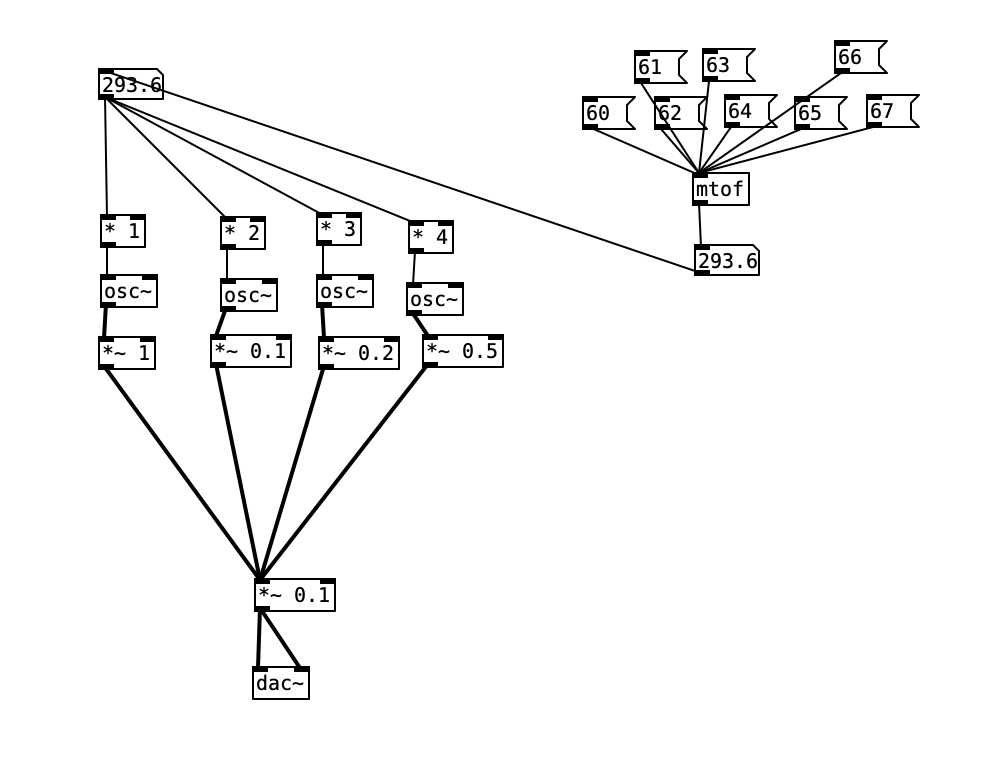
Overtones and Harmonics
-
Generally we call the “lowest” frequency component of a sound the fundamental
-
The others frequency components are overtones
-
Integer multiple of the fundamental are harmonic overtones or just “harmonics”
-
Not-integer multiples are called inharmonic overtones
Consonance and Dissonance in Mixing Sounds
The relationship between frequencies has an important impact on how we perceive sounds.
Adding a frequency multiplied by a simple ratio (e.g., 2, 1.5) provides a consonant sound.
for those musically inclined: x2 is an octave, x3/2 is a perfect fifth, x4/3 is a fourth.
Complicated ratios or multiplication by non-rational numbers leads to dissonant sounds.
e.g., a tritone (augmented fourth) is x45/32
Dissonance isn’t bad!
Inharmonic overtones are a super important part of great sounds like bells, cymbals, triangles, etc (well I am a percussionist…).
Frequency Domain

So far, we have represented sounds as a waveform—this is also known as the “time domain” representation.
An alternative representation shows the frequency information (spectrum) in a sound—this is called the “frequency domain” and we can plot it as a spectrogram.
To obtain frequency domain we use a technique called Fourier analysis (more on this later).
Waveforms
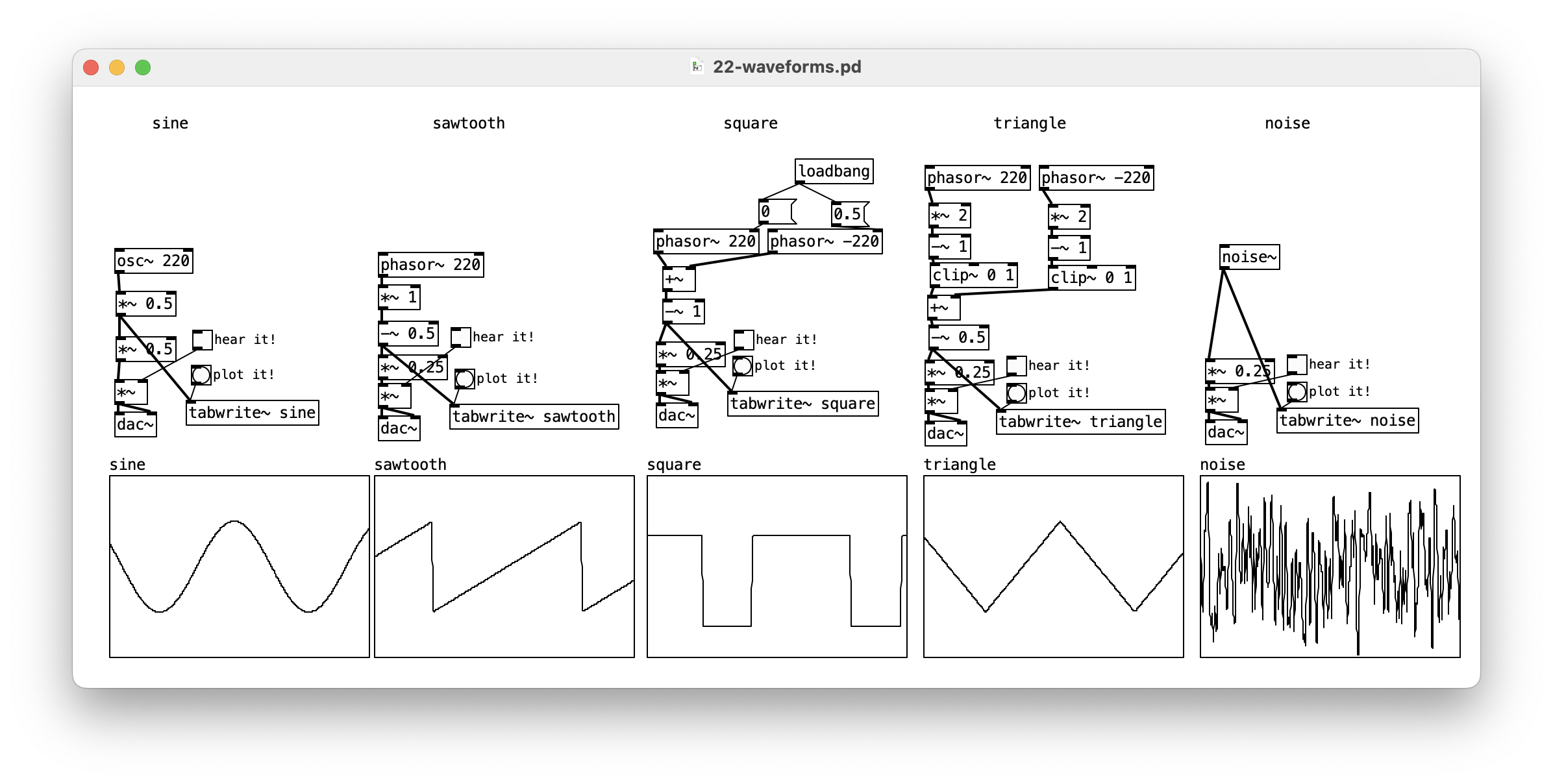
Synthesisers often have different “waveforms” or wave shapes that can provide different timbres. Here are some classics. The “harshness” of these reflects more harmonic overtones.
How does this work?
-
the
phasor~object creates a sawtooth wave between 0 and 1 (half the full range of -1 to 1). -
phasor~is usually the start of a signal chain, or for driving other sound making processes. -
Notice how we used
*~and-~to scale and centre the waves. -
clip~can be used to remove part of a wave -
if
phasor~has a negative frequency it produces the reverse slope -
the second input of
phasor~controls phase (what does this do?)
Do it!
Make an additive synth with a couple of osc~ objects. Try different
“multipliers” on the frequency to create interesting sounds!
Reading and Links
-
Dannenberg, R. B. Introduction to Computer Music: Chapters 1–2 (online here)
-
Kreidler, J. Programming Electronic Music in Pd: Chapters 3.2, 3.5