The change I made isn’t visible on the website#
There are a few reasons why a change might not be visible on the website.
- The website is still building
- Your change was saved as a draft and hasn’t been published
- There is an error that has stopped the build.
The website is still building.#
If you navigate to the GitLab page for your website (e.g. https://gitlab.anu.edu.au/jekyll-anu/college-website for the College website) and you see a blue circle or an orange circle like in the images below, this means the website hasn’t finished building yet. Give it another couple of minutes and check back. Depending on the size of your website and the number of assets, this may take several minutes.


Your change was saved as a draft and hasn’t been published.#
Open the page you edited and check that it has been published.
If you open the page and the status button reads Draft, In Review or Ready the page hasn’t yet been published.

Set the status to Ready and then click Publish. Wait a few minutes for the page to build and you should see your change.
There is an error that stopped the build.#
If you navigate to the GitLab page for your website and you see a red cross like below, this means something is broken.

- Click on the red cross
- If the next page shows a red cross next to
page-deploy, contact the Computing Facilities team. This is an error on the server-side, not the content that you’ve just tried to add. - If the red cross is next to
page-buildlike in the example below, click on it and this will show you the error page.
This page can be intimidating! But scroll down until you see red error text like the following image:
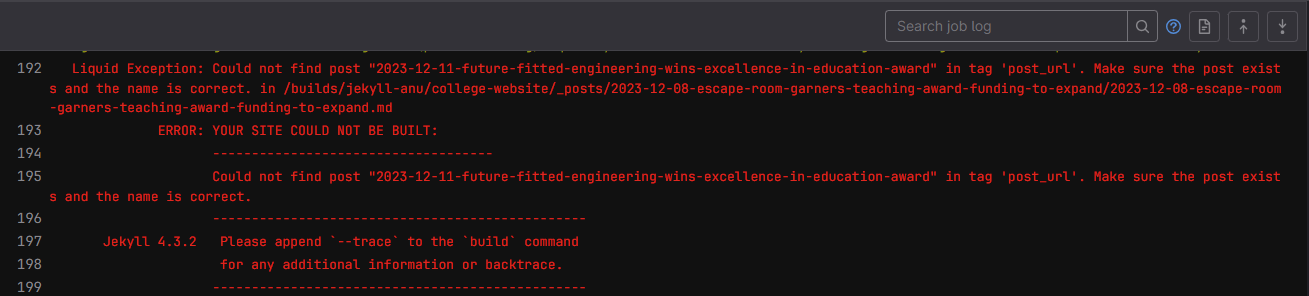
I’ve copied this error text below:
Liquid Exception: Could not find post "2023-12-11-future-fitted-engineering-wins-excellence-in-education-award" in tag 'post_url'.
Make sure the post exists and the name is correct.
in /builds/jekyll-anu/college-website/_posts/2023-12-08-escape-room-garners-teaching-award-funding-to-expand/2023-12-08-escape-room-garners-teaching-award-funding-to-expand.md
             ERROR: YOUR SITE COULD NOT BE BUILT:
                    ------------------------------------
                    Could not find post "2023-12-11-future-fitted-engineering-wins-excellence-in-education-award" in tag 'post_url'. Make sure the post exists and the name is correct.
This text contains information about what went wrong.
"Could not find post "2023-12-11-future-fitted-engineering-wins-excellence-in-education-award" tells us that the post (news/events post) "2023-12-11-future-fitted-engineering-wins-excellence-in-education-award" could not be found.
"Make sure the post exists and the name is correct. in /builds/jekyll-anu/college-website/_posts/2023-12-08-escape-room-garners-teaching-award-funding-to-expand/2023-12-08-escape-room-garners-teaching-award-funding-to-expand.md" tells us that the post is being linked in the news post "2023-12-08-escape-room-garners-teaching-award-funding-to-expand".
To fix the error, we would:
- Check that the post
2023-12-11-future-fitted-engineering-wins-excellence-in-education-awardexists. - Check that the name of the post is correct in the link.
- Check that the link to the post is correct.
Each error message will look slightly different based on what the problem is, but it will generally tell you what page/post the error occurs in, and what link is broken in that page/post.
I didn’t find any red text!
If you scrolled through and you didn’t find any red error messages like the above, the error is probably on the server side, and not related to the change you just tried to make. Contact the Computing Facilities team for assistance.
The red text doesn’t give me any details about the error
This usually occurs when you are writing html directly into the content on your page. The error will look something like this:

The error you receive here probably an html specfic error. In this particular case, in the college-website/study/more/experience/ page, there is an empty link. So you would next go to this page and check that every link [text](hyperlink) you’ve included has an associated hyperlink.
The formatting on my page is broken#

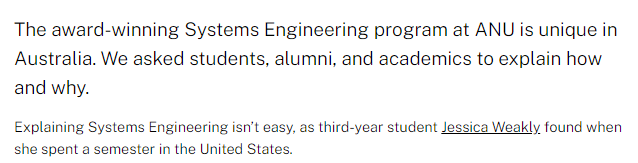
If you notice that the formatting on your page is broken like in the above image where you can see the text {:.lead} instead of the following paragraph being enlarged, or if internal images are displaying as plaintext [text](hyperlink) instead of displaying the image:
- Open the page/post in the CMS.
- Check that you are using the markdown editor.
- Look for any trailing backslashes
\at the end of sentences, or adjacent to tags like{:.lead}. Note: These will not be visible in the Rich Text Editor.
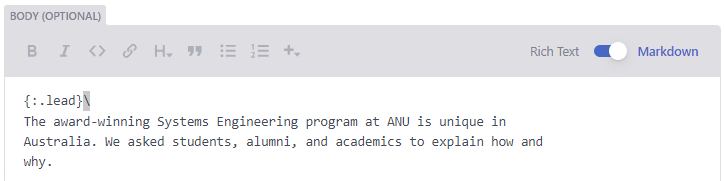
- Remove all trailing backslashes that you find.
- Save and publish your page/post.
Below you can see the formatting of the above images when the trailing backslashes are removed.
Why did this happen?
When you use the Rich Text Editor in combination with Markdown syntax or tags like {:.button} or {:.lead}, the rich text editor inserts a backslash around each of these elements, in order to display them as text. This is a known bug that we sadly can’t control!
How do I prevent this happening again? Always use the Markdown editor when creating or editing a page.