Lab 7
Note: The lab exercises are intended to be completed in class. If you also manage to complete the programming problems, well done. If not, you should complete them during the week and raise any queries you have about them with your tutors in next week’s lab.
If you have any questions about or difficulties with any of the material covered in the course so far, ask your tutor for help during the lab.
Some exercises from this lab are set up in Codebench.
Objectives#
The purpose of this week’s lab is to:
- Review two of python’s built-in sequence types - strings and lists - and introduce the third built-in sequence type, tuples.
- Contrast a reference to an object with a copy of an object, in the context of lists.
- Understand more about variable scope, in the context of function calls.
Sequence types: strings and lists#
Remember that:
strandlistare sequence types.- A string (value of type
str) can only contain characters, while a list can contain elements of any type - including a mix of elements of different types in the same list. - Strings are immutable, while list is a mutable type. (What does mutable mean? This is explained in Section Section 7.6 (pages 310 to 321) of Punch & Enbody’s book, Chapter 10 in Downey’s book, and, of course, in Monday’s lecture.)
Exercise 0#
Operations on python’s built-in sequence types are summarised in this section of the python library reference. You may want to revisit exercise 2 of Lab 5 to remind yourself of how indexing, slicing and operations on sequences work.
Because lists are mutable but strings are not, you can assign a new element to an index in the list, or a list to a slice of the list, but you cannot do this with strings. Try the following:
In [1]: a_str = "acd"

In [2]: a_str[1]
Out [2]: ...

In [3]: a_str[1] = 'b'

In [4]: a_str
Out [4]: ...

In [5]: a_list = [1,3,2,4]

In [6]: a_list[1] = 2

In [7]: a_list
Out [7]: ...

In [8]: a_list[2:3] = [5,7]

In [9]: a_list
Out [9]: ...
Mutable objects and references#
In python, every value computed by the interpreter is an object. An object in python has:
-
An identity: This is a number assigned by the python interpreter when an object is created. You can access this number using the
idfunction. Examining the identity of an object is typically not useful in the programs you write, but it will sometimes help you to understand what is happening. -
Some attributes: This is information about the object. An attribute that every object has is a type, which tells us (and the python interpreter) what kind of object it is. Other attributes tell us something about the “content” of the object (for example, if the object is of type
int, that is, an integer, what integer it is).
When we assign a value to variable, the variable name is associated with a reference to the object; that is, essentially, the objects identity. Several variables can refer to the same objects.
A mutable object is one that can be modifed. This means that we can change the object’s attributes. The object’s identity remains unchanged.
Downey’s book describes mutable objects (specifically, lists) and aliasing (multiple names referring to the same object) in Chapter 10. Punch & Enbody’s book describes it in Section 7.6 (pages 310 to 321).
Exercise 1(a)#
The following code attempts to construct a table containing the first three rows of the periodic table. Run the following commands in the python shell:
In [1]: row1=["H","He"]
In [2]: row2=["Li","Be","B","C","N","O","F","Ar"]
In [3]: row3=["Na","Mg","Al","Si","P","S","Cl","Ne"]
In [4]: ptable=row1
In [5]: ptable.extend(row2)
In [6]: ptable.extend(row3)
- What is the value of
ptablenow? - What is the value of
row1now? Is this what you expected? - Correct the error in
row2(Ar should be Ne) by executing a command of the formrow2[?] = ?. (The question mark means it is for you to figure out what is the right index to change. You should not write a literal?.) What happens toptableas a result of this assignment? - Correct the error in
row3(Ne should be Ar) by executing a command of the formptable[?] = ?. What happens torow3as a result of this assignment?
To help explain what is happening, use the id function to see the
identities of the objects referenced by each of the variables:
In [7]: id(row1)
Out [7]: ...
In [8]: id(row2)
Out [8]: ...
In [9]: id(row3)
Out [9]: ...
In [10]: id(ptable)
Out [10]: ...
You should find that row1 and ptable both reference the same object
(a list), but that the contents of row2 and row3 were copied into
ptable.
If you are uncertain about any of the above, ask your tutor. This may also be a good time to try stepping through and visualising the example using the on-line tool pythontutor.com: Copy the code you want to test into the text box and click the “Visualize Execution” button. Remember to make sure you have selected “Python 3” in the menu above where you enter the code.
Exercise 1(b)#
Now execute the following commands (make sure you redefine the rows):
In [1]: row1 = ["H","He"]
In [2]: row2 = ["Li","Be","B","C","N","O","F","Ar"]
In [3]: row3 = ["Na","Mg","Al","Si","P","S","Cl","Ne"]
In [4]: ptable = [row1]
In [5]: ptable.append(row2)
In [6]: ptable.append(row3)
- What is the value of ptable now? How does this differ from what you had in Exercise 1(a)?
- What is the value of
row1now? How does it differ from what you had in Exercise 1(a)? - To get the first element of the first row from
ptable, you would use the expressionptable[0][0]. Write the expressions to get the sixth element from the second row (“O”) and the second element from the third row (“Mg”). Use only theptablevariable, notrow2orrow3. - Correct the error in row 2 (Ar should be Ne) by executing a
command of the form
row2[?] = ?. Does this also changeptable? - Correct the error in row 3 (Ne should be Ar) by executing a
command of the form
ptable[?][?] = ?. Does this changerow3?
Again, you can use the id function to see the identities of the
objects involved (try both id(ptable) and id(ptable[0])).
You should find that each element in ptable is a reference to
one of the row lists.
Again, if you want to visualise what is going on, try pythontutor.com.
Shallow and deep copies#
In Exercise 1(a) you assigned ptable the list referenced by row1
via the statement ptable = row1. Subsequent operations showed that
ptable and row1 referenced the same object (list). How do we
actually make a copy of a list?
Exercise 1(c)#
Execute the following commands:
In [1]: row2=['Li', 'Be', 'B', 'C', 'N', 'O', 'F', 'Ar']
In [2]: ptable1=["H","Xe",row2]
In [3]: ptable2=ptable1[:]
- Is
ptable1a list, a list of lists or a mix of both? (Print it out!) - Correct element “Xe” in
ptable2to be “He”. Is the change propagated toptable1? - Correct element “Ar” in
ptable2to be “Ne”. Is the change propagated toptable1and torow2?
You should find that after executing ptable2=ptable1[:] ptable2 is
a copy of ptable1 (not having the same id) but the third element is
a reference to row2.
The effect of adding [:] to the ptable2=ptable1 assignment is to
create a so-called shallow copy of ptable1.
Exercise 1(d)#
Execute the following commands
In [1]: row2=['Li', 'Be', 'B', 'C', 'N', 'O', 'F', 'Ar']
In [2]: ptable1=["H","Xe",row2]
In [3]: import copy
In [4]: ptable2=copy.deepcopy(ptable1)
- Now correct the “Ar” to “Ne” by assigning the right element of
ptable2. Inspect to see whether the elements ofptable1orrow2have changed. (You should find no changes.)
However, you should (almost) never use deepcopy: it is much slower and consumes more memory than shallow copy; it may also cause problems with circular references (such as list containing a reference to itself). Any problems with shared references can always be avoided by thinking more carefully about how you have structured your code.
Exercise 2: Debugging#
Just like strings, the list data type has several useful methods.
For example, read help(list.append), help(list.insert) and
help(list.extend) to see the documentation of some of the methods
that modify lists.
Modifying methods and operations for mutable sequence types (i.e., list)
are summarised in
this section of the python documentation.
Below are two attempts to write a function, make_list_of_lists,
that creates a list of n lists of increasing ranges of integers.
The first entry in the returned list should be an empty list, the
second a list of length one, ending with the number 1, and so on.
For example, make_list_of_lists(3) should return
[ [], [1], [1, 2] ].
(Note that n must be a non-negative integer.)
However, both functions are incorrect. Locate the error in each
function and explain why it goes wrong.
Function 1#
def make_list_of_lists(n):
    the_list = []
    sublist = []
    while n > 0:
        the_list.append(sublist)
        sublist.append(len(sublist) + 1)
        n = n - 1
    return the_list
Function 2#
def make_list_of_lists(n):
    the_list = []
    sublist = []
    for i in range(n):
        the_list.extend(sublist)
        sublist = sublist.insert(len(sublist), i)
    return the_list
Functions: namespaces and scope#
Recall that:
-
A namespace is a mapping that associates (variable) names with references to objects. Whenever an expression involving a variable is evaluated, a namespace is used to find the current value of a variable. (The namespace is also used to find the function associated with a function name. Functions are objects too, and function names are no different from variable names.)
-
In python there can be multiple namespaces. Variables with the same name can appear in several namespaces, but those are different variables. A variable name in one namespace can reference (have as value) any object, and the same name in a different namespace (which is a different variable) can reference a different object.
-
When a variable is evaluated, the python interpreter follows a process to search for the name in the current namespaces.
-
Whenever a function is called, a new local namespace for the function is created.
-
The function’s parameters are assigned references to the argument values in the local namespace. Any other assignments made to variables during execution of the function are also done in the local namespace.
-
The local namespace disappears when the function finishes.
The name-resolution rule in python is Local - Enclosing - Global - Built-in (abbreviated LEGB). This rule defines the order in which namespaces are searched when looking for the value associated with a name (variable, function, etc). The built-in namespace stores python’s built-in functions. Here we will only focus on the two that are most important for understanding variable scope in function calls: the local and global namespaces.
The local namespace is the namespace that is created when a function
is called, and stops existing when the function ends. The global
namespace is created when the program (or the python interpreter)
starts executing, and persists until it finishes. (More technically,
the global namespace is associated with the module __main__.)
Python provides two built-in functions, called locals() and globals(),
that allow us to examine the contents of the current local and global
namespace, respectively. (These functions return the contents of the
respective namespace in the form of a “dictionary” - a data type
which we will say more about later in the course. However, for the
moment, the only thing we need to know about a dictionary is how to
print its contents, which can be done with a for loop as shown in the
examples below.)
Exercise 3(a)#
The following code is adapted from an example in Punch & Enbody’s book
(page 417). Save it to a file (say, local.py) and execute it:
global_X = 27

def my_function(param1=123, param2="hi mom"):
    local_X = 654.321
    print("\n=== local namespace ===")  # line 1
    for name,val in list(locals().items()):
        print("name:", name, "value:", val)
    print("=======================")
    print("local_X:", local_X)
    # print("global_X:", global_X)  # line 2

my_function()
It should execute without error.
- How many entries are there in the local namespace?
- Does the variable
global_Xappear in the local namespace? If not, can the function still find the value ofglobal_X? To test, uncomment the print call marked “# line 2” and see if you are able to print its value. - Add the statement
global_X = 5to the function, before printing the contents of the local namespace (i.e., just before line marked “# line 1”). What value then is printed on # line 2? Why? - Print the value of
global_Xafter the call tomy_function. Does its value change after reassignment in the function?
Exercise 3(b)#
The following program is from the next example in Punch & Enbody’s
book (page 418). Save it to a file (say, global.py) and run
it:
import math
global_X = 27

def my_function(param1=123, param2="hi mom"):
    local_X = 654.321
    print("\n=== local namespace ===")
    for name,val in list(locals().items()):
        print("name:", name, "value:", val)
    print("=======================")
    print("local_X:", local_X)
    print("global_X:", global_X)

my_function()
print("\n--- global namespace ---")   # line 1
for name,val in list(globals().items()):  # line 2
    print("name:", name, "value:", val)
print('------------------------')     # line 3
# print('local_X: ',local_X)          # line 4
print('global_X:',global_X)
print('math.pi: ',math.pi)
# print('pi:',pi)                     # line 5
The program should execute without error.
- What entries are in the global namespace but not the
my_functionlocal namespace? - What entries are in the local namespace of
my_functionbut not in the global namespace? - Move the loop that prints the global namespace (from the line
marked “# line 1” to “# line 3”) into
my_function(just after the loop that prints the local namespace) and run it again. Does the output change? - Is the value of
local_Xprinted if you uncomment the line marked “# line 4”? If not, why not? - Is the value of pi printed if you uncomment “# line 5”? If not, why not?
The Local Assignment Rule
Python’s local assignment rule states that if an assignment to a (variable) name is made anywhere in a function, then that name is local: This means that the assignment creates an association in the local namespace, and that any lookup of the name will be made only in the local namespace. The following program will run without error:
x = 27

def increment_x():
    print("x before increment:", x)
    y = x + 1
    print("x after increment:", y)

increment_x()

print("(global) x after function:", x)
but the following will not:
x = 27

def increment_x():
    print("x before increment:", x)
    x = x + 1
    print("x after increment:", x)

increment_x()

print("(global) x after function:", x)
Note where the program fails: The first attempt to get the value of x
causes the error, because x has not been assigned a value in the local
namespace.
The global keyword can be used inside a function to escape from the
local assignment rule. If a global name statement appears anywhere in
the function, name will be searched for, and assigned, in the global
namespace (and only in the global namespace). Therefore, the following
also works:
x = 27

def increment_x():
    global x
    print("x before increment:", x)
    x = x + 1
    print("x after increment:", x)

increment_x()

print("(global) x after function:", x)
and the function now references, and changes the global variable x.
Introducing tuples#
As mentioned at the start of the lab, python has a third built-in
sequence type, called tuple. Like a list, tuples can contain any
type of value, including a mix of value types. The difference between
type list and type tuple is that tuples are immutable.
To create a tuple, you only need to write its elements separated by commas:
In [1]: aseq = 1,2,3,4

In [2]: type(aseq)
Out [2]: ...
It is common practice to write a tuple in parentheses, like this:
In [1]: aseq = (1,2,3,4)

In [2]: type(aseq)
Out [2]: ...
and the python interpreter will usually print tuples enclosed in parentheses. However, remember that it is the comma that creates the tuple, not the parentheses! To see this, try the following:
In [1]: x = (1)

In [2]: type(x)
Out [2]: ...

In [3]: x = 1,

In [4]: type(x)
Out [4]: ...
There is one exception: To create an empty tuple (a tuple with length
zero), you have to put a comma between nothing and nothing! Typing
x = , does not work. Instead, use an empty pair of parentheses to
create an empty tuple, like this: x = ().
Exercise 5#
Retry the tests you did in Exercise 2 in Lab 5 with tuple values:
In [1]: aseq = (1,2,3,4)

In [2]: bseq = 1,3,2,4

In [3]: type(aseq)        # 1. what type of sequence is this?
Out [3]: ...
                          # 2 - 9 as before.
Also try assigning to an element and to a slice of the tuple, as in Exercise 0: this should give you an error, because the tuple type is immutable.
Programming problems#
Note: We don’t expect everyone to finish these problems during the lab time. You should continue working on them later.
Pop and slice#
The list method pop(position) removes the element in the given position
from the list (read help(list.pop) or
the on-line documentation).
(a) Write a function allbut(a_list, index), which takes as arguments a
list and an index, and returns a new list with all elements of the argument
list (in the order they were) except for the element at index. The
argument list should not be modified by the function.
Example:
In [1]: my_list = [1,2,3,4]

In [2]: my_short_list = allbut(my_list, 2)

In [3]: print(my_short_list)
[1, 2, 4]

In [4]: print(my_list)
[1, 2, 3, 4]
(b) A slice expression, a_list[start:end], returns a new list with
the elements from start to end - 1 of the list.
Write a function slice_in_place(a_list, start, end), which takes as
arguments a list and two indices, and modifies the argument list so
that it is equal to the result of the slice expression a_list[start:end].
The function should not return any value.
Example:
In [1]: my_list = [1, 2, 3, 4]

In [2]: slice_in_place(my_list, 1, 3)

In [3]: print(my_list)
[2, 3]
Advanced: Make your slice_in_place function work with both positive
and negative indices (like slicing does).
List shuffle#
Sorting a list puts the elements in order; shuffling it puts them in
(more or less) disorder. The python module random implements a
function called shuffle which randomly shuffles a list. Here, we
will look at a deterministic (non-random) shuffle of a list.
A “perfect shuffle” (also known by many other names) cuts the list in two parts, as evenly sized as
possible, then interleaves the elements of the two parts to form the
shuffled list.
(a) Write a function perfect_shuffle(a_list) which takes as
argument a list and returns the perfect shuffle of the list. The
function should not modify the argument list.
Example:
In [1]: my_list = [1, 2, 3, 4, 5, 6]

In [2]: my_shuffled_list = perfect_shuffle(my_list)

In [3]: print(my_shuffled_list)
[1, 4, 2, 5, 3, 6]

In [4]: print(my_list)
[1, 2, 3, 4, 5, 6]
(b) Write a function perfect_shuffle_in_place(a_list) which
takes as argument a list and performs the perfect shuffle on the list.
The function should modify the list, and not return any value. After
the function call, the argument list should have the same length and
contain the same elements; only the order of them should change.
Example:
In [1]: my_list = [1, 2, 3, 4, 5, 6]

In [2]: perfect_shuffle_in_place(my_list)

In [3]: print(my_list)
[1, 4, 2, 5, 3, 6]
Advanced: Write a program that repeatedly shuffles a list using this function and counts how many shuffles are done before the list becomes equal to the original list.
Nested lists#
A list that contains lists is sometimes called nested. We define the nesting depth of a list as follows:
- A list that does not contain any list has a nesting depth of zero
- A list that contains lists has a nesting depth equal to the maximum nesting depth of the lists it contains, plus one.
Note that “a list that contains lists” can also contain values that are not lists.
For example, the nesting depth of [[1,2], [2,4]] is 1, while the
nesting depth of [1, [2], [[3], [[4], 5]]] is 3.
Write a function that takes as argument a list and returns its nesting depth.
What does your function return when called with the list [[[]]]?
(and is that what it should return?)
2-dimensional matrices#
A diagonal matrix is a square (n x n) matrix M such that
only elements on the diagnonal (where row equals column, that is,
M[i,i]) are non-zero.
This can be generalised:
Say a matrix M has diagonality d if M[i,j] != 0 only
in positions such that the absolute difference between
i and j is strictly less than d.
(Thus, a diagonal matrix has diagonality 1.)
For example, this matrix has diagonality 3:
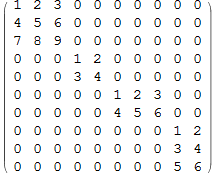
(a)
Write a function diagonality(matrix) which takes as argument a
matrix (represented as a list of lists)
and returns the smallest d such that matrix has
diagonality d.
(b) (advanced) The diagonality of a matrix can sometime be decreased by rearranging the order of rows and columns. For example, the matrix
    [[1, 2, 0, 0],
     [0, 0, 5, 6],
     [3, 4, 0, 0],
     [0, 0, 7, 8]]
has diagonality 3, but swapping the two middle rows results in the matrix
    [[1, 2, 0, 0],
     [3, 4, 0, 0],
     [0, 0, 5, 6],
     [0, 0, 7, 8]]
with diagonality 2.
First, work out how to swap a pair of rows, or a pair of columns in a matrix. You probably need to use some temporary variable to hold one of the vectors/values being swapped.
Next, write a function that attempts to minimise the diagonality of a given matrix by repeatedly swapping rows or columns. A simple idea is to look at the result of every possible swap and check if has lower diagonality. However, this may not always be enough, as several swaps may be necessary to reduce the diagonality.