Outline#
Before you attend this week’s lab, make sure:
-
you can read and write basic assembly code: programs with registers, instructions, labels and branching
-
you’ve completed the week 9 lab
-
you’re familiar with the basics of functions in the lectures
In this week’s lab you will:
-
learn about the bit-twiddle-store pattern for setting and clearing bits in memory
-
write functions (subroutines) to break your program into reusable components
-
pass data in (parameters) and out (return values) of these functions
-
keep the different parts of your code from interfering with each other (especially the registers) using the stack
We will be using the lab-08 folder in the same pack you were using last week. If you didn’t clone it then, make sure you clone it now.
Introduction#
In this week’s lab you will learn how to use functions to faciliate reuse of code, and to provide more structure to your programs.
But first we have a little task beforehand!
Task 1: The Load-Twiddle-Store Pattern#
The load-twiddle-store pattern is a useful pattern for writing specific bits to certain memory addresses. This is particularly useful for doing things such as controlling hardware via memory mapped I/O
The basic idea is this:
- load some data from memory into a register
- operate on (“twiddle”) the value in the register (e.g. with an
addorandinstruction) - store this new value from the register back into memory
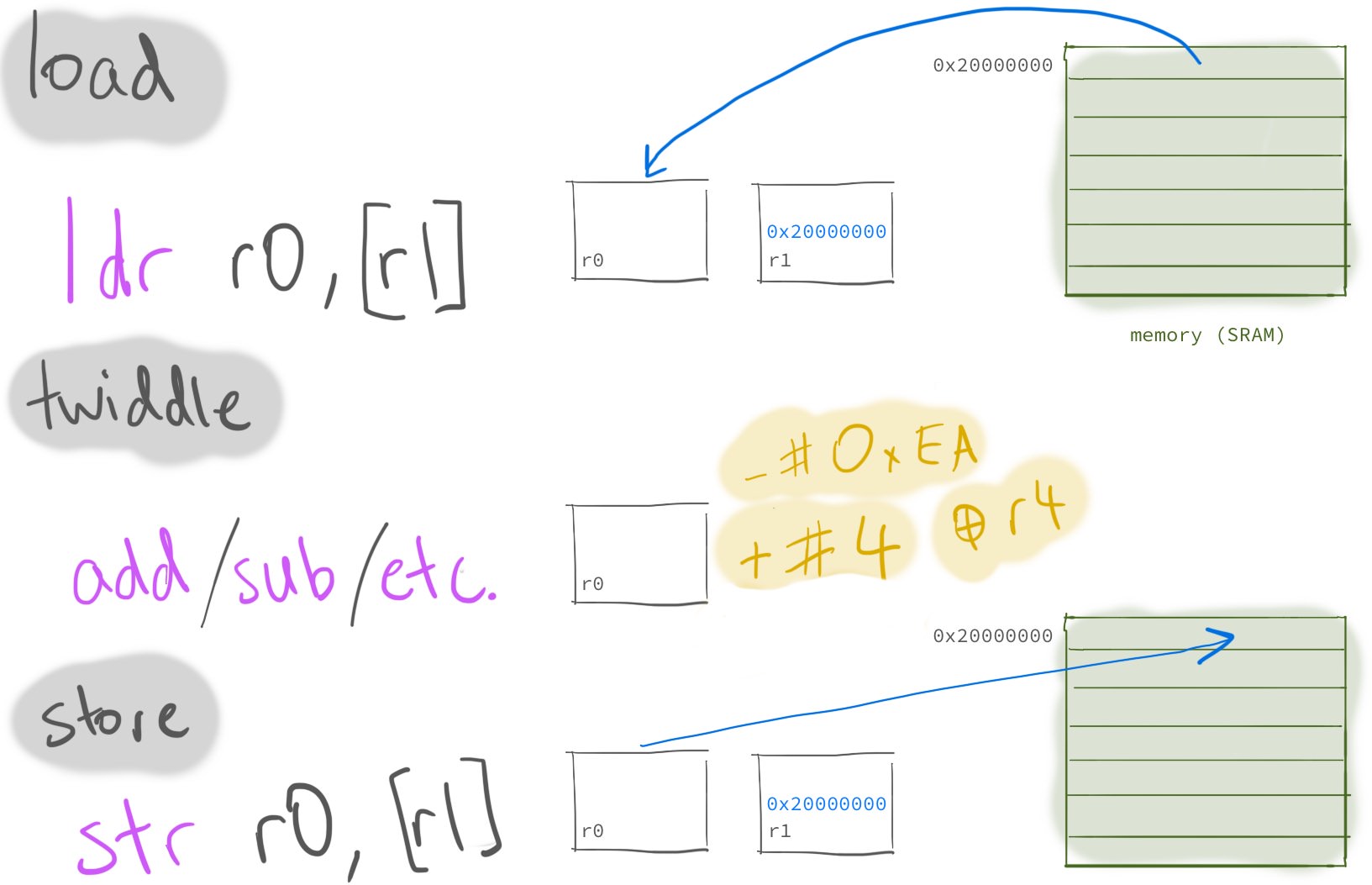
Let’s now make use of a data section to store some (spoilers) data, and attempt to load-twiddle-store.
.syntax unified
.global main

.type main, %function
main:
  ldr r1, =storage
  @ your code starts here

end_check: @ <-- don't remove this label
  nop
inf_loop:
  nop
  b inf_loop

.data
storage:
  .word 2, 3, 5, 0 @ don't change this line
Starting with the code above, use the load-twiddle-store pattern to change
the first four data words to 2 1 7 1 instead of 2 3 5 0. Hint:
first load the storage label using the = instruction, then remember that you
can load and store with an offset from this base address
(check the cheat sheet).
You’ll probably also want to use the memory browser view (like you did in week 7) to watch the values
change in memory.
Note that while you can simply store immediate values and skip the “load” part of the “load-twiddle-store” pattern here, you should still do it anyway.
Copy the code from your load-twiddle-store program into completed-tasks/task-1.S.
Commit and push your changes with the message “completed task 1”. The CI will
run a test to verify you have completed this task successfully.
Overview: Functions#
Functions are (usually reusable) blocks of code that have been designed to perform a specific task. Using functions allows us to break a big task (e.g. calculating the mark of a set of students) into smaller ones, which in turn can often be broken down into even smaller ones (e.g. setting and clearing a bit, potentially). How fine-grained you should break things down is a design choice that you get to make when you design your program.
The general pattern for functions look like this:
main:
  @ put arguments in registers
  @ mov r0, ...
  bl foo  @ call function foo
  @ continue here after function returns
  @ ...

.type foo, %function  @ optional, telling compiler foo is a function
@ args:
@   r0: ...
@ result: ...
foo:
  @ does something
  bx lr   @ return to "caller"
.size foo, .-foo      @ optional, telling compiler the size of foo
You will notice that this looks very much like the label stuff we did in the basic machine code lab—and you’d be right. Since functions are just blocks of instructions, labels are used to mark the start of functions.
The only difference between a function and the “branch to label” code you’ve
written already in this course (with b or perhaps a conditional
branch) is that with a function we want to return back to the
caller (e.g. the main function) code; we branch with bl but we want to
“come back” when we’re done with the function instructions.
That’s why bl foo and bx lr are used in the code template above instead of
just b foo.
The bl foo instruction:
- records the address of the next instruction (i.e. the next value of
pc) in the link register (lr), and - branches to the label (
foo)
The bx lr instruction
- branches to the memory address stored in the
lrregister
So, together these two instructions enable branching to a function (bl foo)
and branching back (bx lr) afterwards.
The .type and .size directive are optional—together they tell the compiler
that the label is a function, and what the size of the function is (.-foo
means current position minus the position of the label foo). They are
essential for the disassembly view to work correctly for the function. They
also slightly change what value the label has in instructions like ldr r0, =main.
If you’d like to add these annotations to your functions, check out the Tips and Tricks page and what it says about VSCode snippets, which are very convenient for this :).
Arguments / Parameters#
Another useful aspect of functions is the ability to pass arguments.
As discussed in the lecture on functions, we leave values in r0-r3
before calling bl to act as “inputs” for our functions. Consider the following
sum_x_y function:
main:
  mov r0, 3   @ first argument, x
  mov r1, 2   @ second argument, y
  bl sum_x_y  @ call sum_x_y(3, 2)
  @ get result back in r0

.type sum_x_y, %function
@ Sums 2 values
@ args:
@   r0: x
@   r1: y
@ returns:
@   r0: x + y
sum_x_y:
  add r0, r1
  bx lr
.size sum_x_y, .-sum_x_y
The function adds the values in r0 and r1 and puts the result in r0. So
the values in r0 and r1 are arguments (or parameters—same concept,
different name). We can just leave the numbers we want to add in r0 and r1,
call the function sum_x_y, and expect the result to be in r0 after it
finishes.
Did you notice something “underhanded” going on between the caller (main) and
the callee (sum_x_y)? There is an implicit contract/agreement as to:
- which registers hold the input arguments, and
- which registers hold the result
This is called calling convention, a set of rules that all function calls are expected to adhere to. It is generally CPU architecture and programming language defined.
Calling convention is super important, as such, it has its own page. Go and have a read of it now and then continue once you’re done. If you have any questions about this then ask your tutor.
You may or may not have noticed that we haven’t told you to store the lr register onto
the stack–that’s cause you’re creating what are called “leaf” functions. These
leaf functions don’t call other functions, so don’t need to worry about
having lr overwritten.
Task 2: Basic Functions#
In the previous lab you were tasked with finding the total size in bytes a given array takes up in memory.
Click here for a sample solution for the task.
.syntax unified
.global main

.type main, %function
main:
  ldr r0, =an_array
  ldr r1, =another_array
  sub r1, r0 @ THINK: make sure you understand why this works!
end_check:
  nop
inf_loop:
  nop
  b inf_loop

.data
an_array:
.word 0x59d2d9d8, 0x3e682394, 0x5a832dcb, 0x821c34ae
another_array:
.word 0x00000000, 0x00000001
Your first task of this lab will involve functionalizing this code. “Functionalizing” means we want to write a function that abstracts away the specific array we calculated the size of previously, and instead have a function we could call with any array.
Copy the following code into main.S.
.syntax unified
.global main
.global get_array_size

.type main, %function
main:
  nop

  @ 1. Find the size of `an_array`
  @ ... set arguments to function here ...

  bl get_array_size
  @ Once you return here, r0 should contain 16 (0x10)

  @ 2. Find the size of `another_array`
  @ ... set arguments to function here ...

  bl get_array_size
  @ Once you return here, r0 should contain ...

  @ 3. Find the size of `third_array`
  @ ... set arguments to function here ...

  bl get_array_size
  @ Once you return here, r0 should contain ...

inf_loop:
  nop
  b inf_loop

.type get_array_size, %function
@ returns the total size in bytes of an array
@ args:
@   r0: The memory address of the start of the array
@   r1: The memory address of the end of the array
@ returns (in r0): total size in bytes of the array
get_array_size:
  nop
  @ ----- Fill in your code here -----

  @ ----------------------------------
  bx lr
.size get_array_size, . - get_array_size

.data
an_array:
.word 0x59d2d9d8, 0x3e682394, 0x5a832dcb, 0x821c34ae
another_array:
.word 0x00000000, 0x00000001
third_array:
.hword 0x1234, 0xABCD, 0xEFFF
end_mem:
.word 0xffffffff
Note that the comment just above the get_array_size label is a
function preamble. In general a function preamble describes:
- What the function does
- The arguments it expects, and the registers those arguments are passed in
- The value it returns (if any), and the register it is returned in.
In this specific case the function preamble tells you that get_array_size will
expect to see the starting address of the array in r0, the ending address of
the array in r1, and that it will return the result in r0.
Write the function get_array_size. After this, add instructions to main to
call the function with the correct arguments (placed in the correct registers)
to:
- Calculate the size of
an_array. - Calculate the size of
another_array. - Calculate the size of
third_array.
The main function in the template above has some comments included indicating
where you should initialize your arguments before each call to get_array_size.
Step through your code and verify that r0 contains the correct result after
each call to get_array_size. The template code contains a comment indicating
what the correct value will be for an_array, but it’s up to you to determine
what the result of the other calls should be.
When you start to use functions, the usefulness of the step over vs step
in buttons in the debugger toolbar starts to become clear. When the debugger
is paused at a function call (i.e. a bl instruction) then step over will
branch, do the things without pausing, and then pause when the function
returns, while step in will follow the branch, allowing you to step
through the called function as well. Sometimes you want to do one, sometimes you
want to do the other, so it’s useful to have both and to choose the right one
for the job.
If you’re confused about what this section is referring to, ask your neighbour
/ tutor to point them out to you.
Copy your code into completed-tasks/task-2.S. Commit and push your work to GitLab.
Verify that it passes the tests.
NOTE: The CI will use different arrays than those provided in the template above to verify your solution. If you fail the CI test, make sure your function works with arbitrary arguments.
Nested Functions#
Now that we have had a taste of functions and parameters, we need to talk about nesting
functions. Let’s consider a toy example, we have 2 functions, one called double and another
called triple. Quite lazily, we have decided that our triple function will use the double
function to compute its output. Our first attempt at writing these functions looks like so:
.type double, %function
@ Doubles a given value
@ args:
@   r0: value
@ returns:
@   r0: value * 2
double:
  add r0, r0
  bx lr
.size double, .-double

.type triple, %function
@ Triples a given value
@ args:
@   r0: value
@ returns:
@   r0: value * 3
triple:
  bl double
  add r0, r0
  bx lr
.size triple, .-triple
There are a few issues with the way we have done things in our first attempt, can you identify what they are? You can think about it a bit before moving on to read the next part.
Here is a diagram of the flow of our program as it stands.
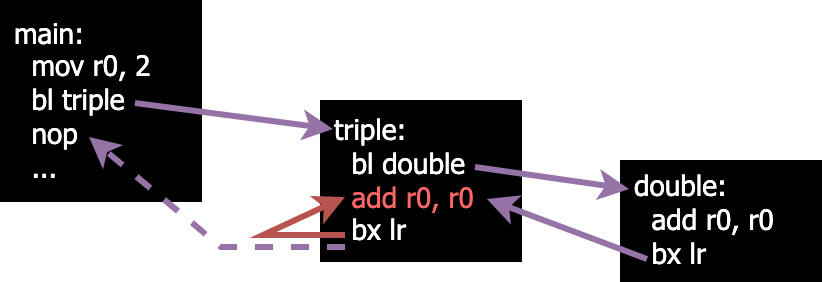
We can see that things are going okay (although we have an incorrect value after the add line in triple)
until we try to return from triple. Instead of ending up at the nop in main we instead return to the
add line in triple.
If you thought that this would happen then congratulations! you’re absolutely right. The
reason for this is that we overwrote the value of our link register when we
called double.
When we call bl, we save the address of the instruction following it into the lr register. This poses
an issue when we want to have nested functions (functions that call other functions) because we lose the address
to return to when we’re finished. We can get around this by utilising the stack.
The Stack#
You may already have a good understanding of what the stack is and how it works, especially if you completed the “Stack and Function Calls” extension in Assignment 1. Even if this is the case we recommend reading this section to ensure you understand how the stack works on ARM specifically.
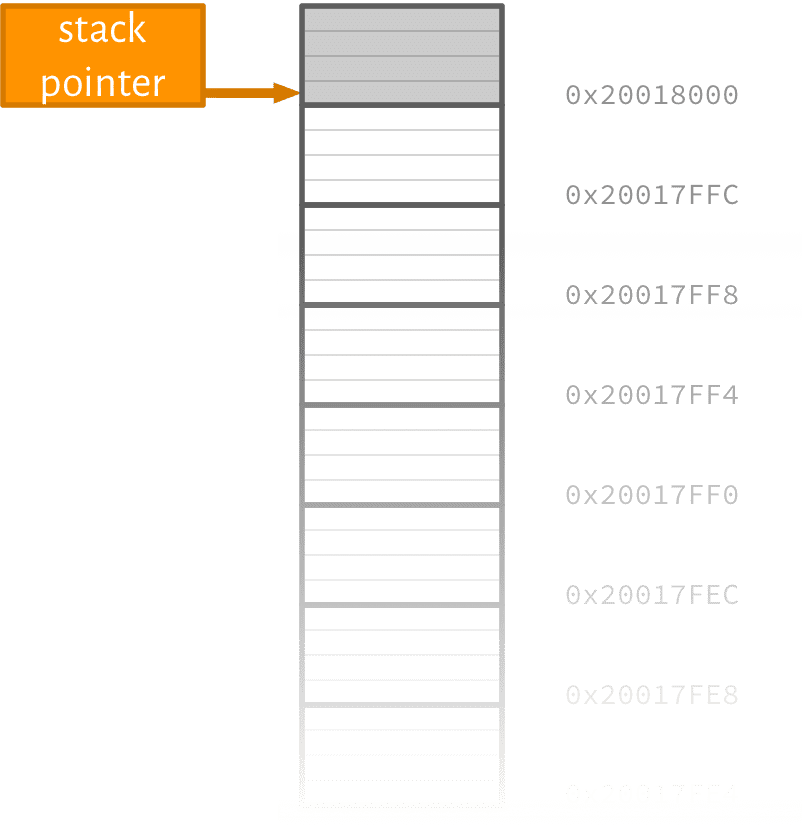
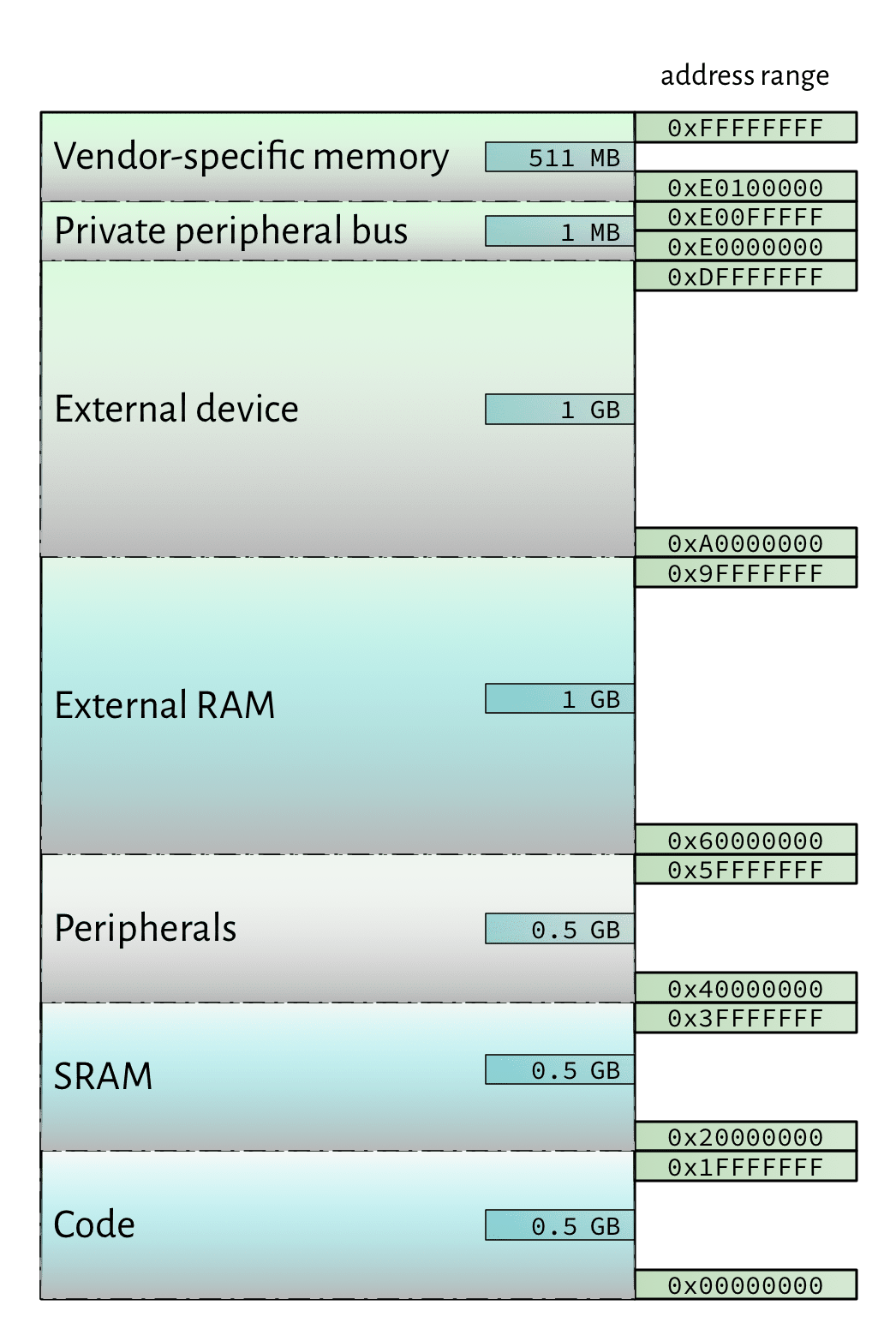
By convention: the value of the sp (stack pointer) is an address in the SRAM region of the
address space (like with the .data section). Basically, it’s memory you can use to get things done and as
long as you maintain good stack practice then you won’t have to worry about interfering with or breaking
other areas of your program.
Common things that get stored on the stack include:
- “saving” values in registers which would otherwise be overwritten (e.g.
lr) - passing parameters/returning values between function calls
- temporary / local variables
It’s called the stack because (in general) it’s used like a first-in-last-out (FILO) stack “data structure” with two main operations: push a value on to the stack, and pop a value off the stack.
Stack Pointer in Memory#
More About the Stack Pointer#
- the value (remember, it’s a memory address) in
spchanges as your program runs spcan either point to the last “used” address used (full stack) or the first “unused” one (empty stack)- you (usually) don’t care about the absolute
spaddress, because you use it primarily for offset (or relative) addressing - stack can “grow” up (ascending stack) or down (descending stack)
- in ARM Cortex-M the convention is to use a full descending
stack starting at the highest address in the address space which points to actual RAM1.
Using the Stack#
So how do we actually use the stack? Well we can treat sp just like any other register containing
a memory address.
Storing
@ Put a value in r2 that we want to store on the stack
mov r2, 0xABC

@ The following are all equivalent for storing r2 on the (full descending) stack.

@ Pre-offset based (expanded)
sub sp, sp, 4     @ decrease sp by 4 to point to the first "empty" spot
str r2, [sp]      @ store r2 at new sp


@ Pre-offset based
str r2, [sp, -4]! @ sp := sp - 4, then store r2 at new sp value
                  @ (the ! makes the offset persist in the register
                  @ contained in the [ ])

@ Dedicated instruction
push {r2}
Loading
@ Assume that the sp is currently pointing to an address that
@ contains a value we want to load into r3

@ The following sections are all equivalent for loading a value
@ into r3 and "removing" it from the stack.

@ Post-offset based (expanded)
ldr r3, [sp]      @ store the value from sp into r3
add sp, sp, 4     @ increase sp by 4 to remove value we just loaded

@ Post-offset based
ldr r3, [sp], 4   @ load value from sp into r3, then sp := sp + 4

@ Dedicated instruction
pop {r3}
You should use the offset based versions at first since it’s more clear what exactly you
are doing, but for later exercises you may want to use the push/pop versions.
All of the above options for loading “remove” the value from the stack, but what does that actually mean? Is the value unrecoverable?
Fixing Our Nested Function#
With our new knowledge of how the stack works, we can fix the issues that we identified previously:
- we were overwriting the
lr(link register) when we made our nested function call - we were losing our value needed to perform the final addition in
triple
double is a leaf function (doesn’t make any nested calls), so no modifications are needed for this
function.
.type double, %function
@ Doubles a given value
@ args:
@   r0: value
@ returns:
@   r0: value * 2
double:
  add r0, r0
  bx lr
.size double, .-double

.type triple, %function
@ Triples a given value
@ args:
@   r0: value
@ returns:
@   r0: value * 3
triple:
  str lr, [sp, -4]! @ Store the link register on the stack
  str r0, [sp, -4]! @ Store the value to triple on the stack
  bl double
  ldr r1, [sp], 4   @ Load the original value to triple into r1
  add r0, r1        @ Add the doubled value with the original value
  ldr lr, [sp], 4   @ Load the original link register value
  bx lr
.size triple, .-triple
These changes result in the following execution flow:
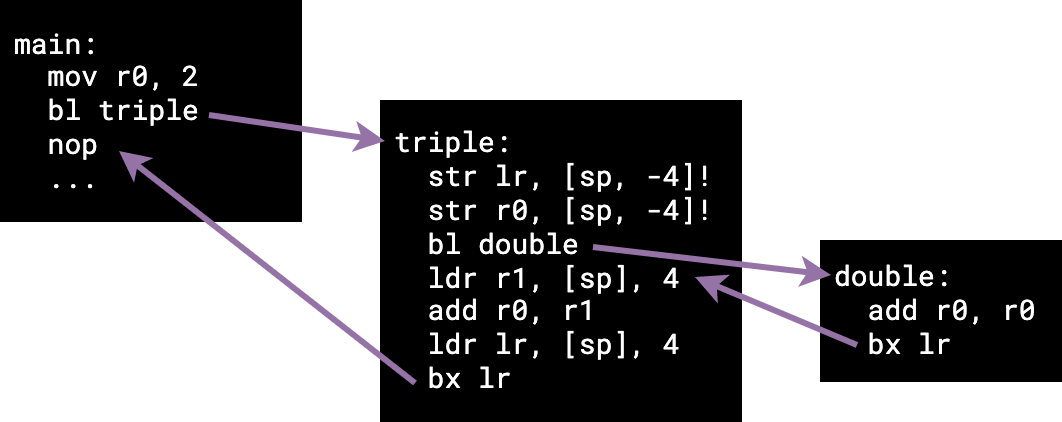
We can see now that by using the stack, we have been able to save the correct
return address (the nop in main) of our nested function triple.
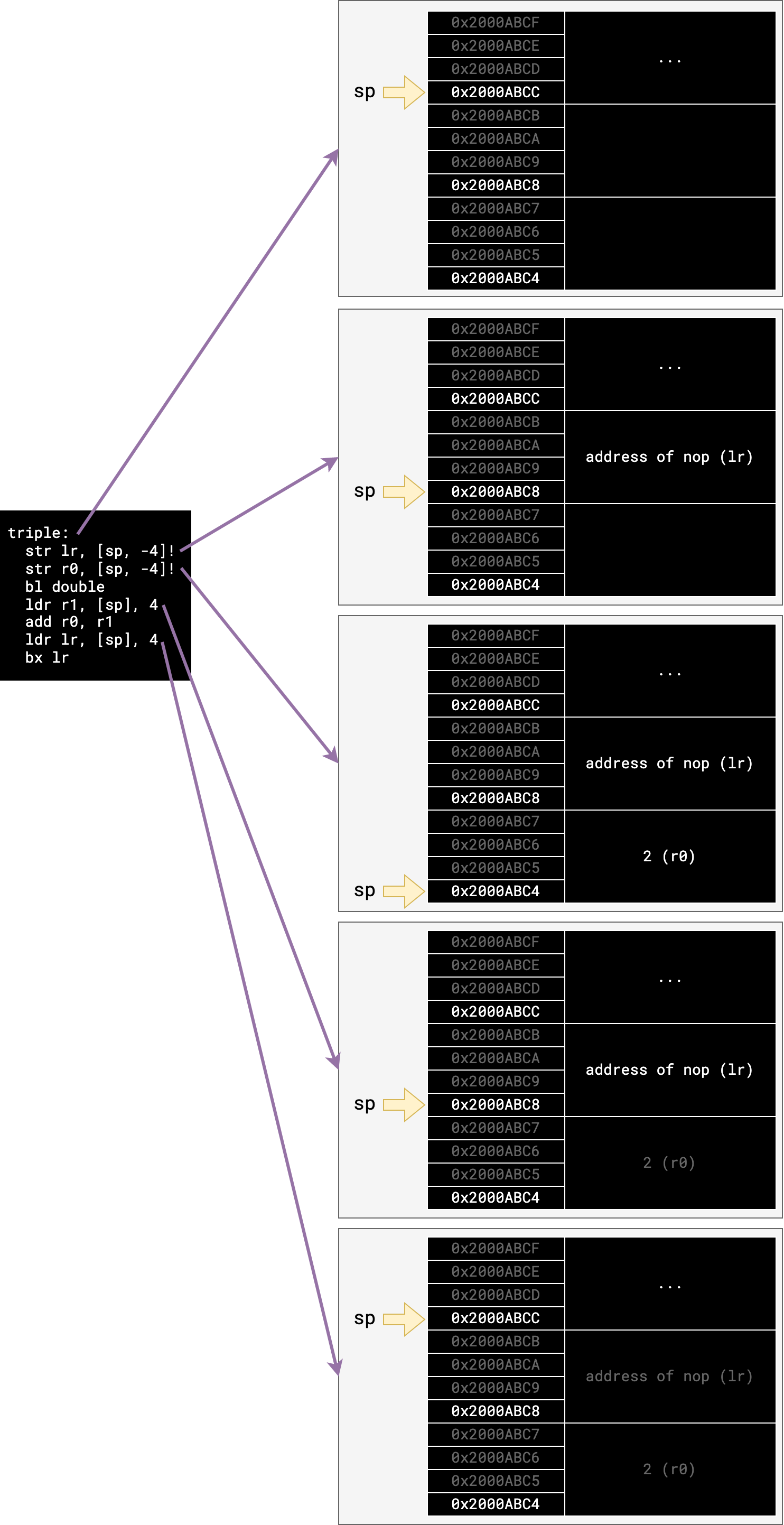
Here is a diagram of how the stack changes with the execution of triple
(where the first stack diagram is the stack view when triple is called, and the
following stack diagrams are the way the stack looks after executing the linked
instruction):
Calling Convention Reminder#
As we mentioned above, following the calling convention when you write ARM assembly is crucial. Please make sure you read it!
As a brief but incomplete summary:
- functions are allowed to overwrite/trash registers
r0-r3 - functions must preserve registers
r4-r11- you can use these registers, you just must return them to how you found them after you’re done!
- return values go in
r0 - function arguments go in
r0, thenr1,r2andr3
Good Examples#
The following piece of code follows the calling convention. Notice how it makes sure to push and pop r4 and r5, to ensure their previous value is preserved after the function returns.
@ Inputs:
@    r0     - the player's existing score
@    r1     - the bonus multipler
@    r2     - the phase of the moon
@
@ Outputs:
@    r0     - the adjusted score
@
adjust_score:
    push {r4, r5, lr}        @ our function modifies r4 and r5, so we must save them here
                             @ so we can restore them later

    @ Save the existing score and multiplier, so that we don't lose
    @ them in our upcoming call to `get_bonus`
    mov r4, r0
    mov r5, r1

    @ Move the arguments into r0 and r1
    mov r0, r1    @ multiplier
    mov r1, r2    @ moon phase
    bl get_bonus
    @ r0 now holds the bonus value

    @ Add the bonus to the original existing score, and put that in r0
    add r0, r4, r0

    @ If the multipler is more than 5, add another bonus 20 points
    cmp r5, #5
    addge r0, r0, #20

    pop {r4, r5, lr}         @ restore r4 and r5 so we left them as we found them
    bx lr
Bad Examples#
Now here’s some examples that do not follow the calling convention.
Can you spot what is wrong with each of these functions? Can you think of how you might fix them?
Example 1#
@ Input:
@    r0 - a number
@ Output:
@    r1 - that number, but make it double
double_trouble:
    add r1, r0, r0
    bx lr
Click here to see the solution.
This function is returning a value in r1 instead of r0.
Example 2#
@ Input:
@    r1, r2    - two numbers to add
@ Output:
@    r0        - the sum
add_two_numbers:
    add r0, r1, r2
    bx lr
Click here to see the solution.
This function is taking arguments from (r1 and r2) instead of (r0 and r1).
Example 3#
@ Input:
@    r0 - a number
@ Output:
@    r0 - that number, plus one
add_one_but_poorly:
    mov r4, r0
    add r0, r4, #1
    bx lr
Click here to see the solution.
This function overwrites the value in r4, which is meant to be preserved for the caller.
Example 4#
How many problems can you find in this function?
@ Inputs : r2
@ Outputs: r3
everything_is_bad:
    add r4, r2, r5
    sub r1, r4, #30
    bl dodgy_double
    add r3, r0, #4
    bx lr
Click here to see the solution.
This function has a lot wrong with it - there are more problems than lines in the function!
- On the first line, it overwrites
r4, which is meant to be preserved for the caller - On the first line, it reads from
r5, which is not meant to store an argument (thus you can’t expect it to have defined contents) - On the first line, it reads from
r2, which would normally store the third argument, but the function only takes in one argument dodgy_doubleseems to take an argument inr1instead ofr0- The function returns a value in
r3instead ofr0 - The function doesn’t preserve
lr, so it gets overwritten in the call tododgy_doubleand thus when it tries to dobx lrit gets stuck
Crikey.
Click here to see a fixed version of this function.
@ Inputs : r0, r1                @ <-- now has two inputs!
@ Outputs: r0
everything_is_fine:
    push {lr}
    add r0, r0, r1
    sub r0, r0, #30
    bl dodgy_double
    add r0, r0, #4
    pop {lr}
    bx lr
If you still have questions about the calling convention, ask your tutor!
Task 3: Arrays as Arguments#
In this task you will write a simple function that iterates through the elements of an array containing 32-bit words and updates their values.
Copy the following code into main.S:
.syntax unified
.global main, update_array

.type main, %function
main:
  nop
  ldr r0, =array
  ldr r1, =array_len
  bl update_array

@ infinite catch loop
inf_loop:
  nop
  b inf_loop

.type update_array, %function
@ ... write a description of what the function does here ...
@ args:
@  r0: base address of array in memory
@  r1: number of elements in the array
update_array:
  nop
  @ ... write your "update_array" function here ...
  bx lr
.size update_array, . - update_array

.data
array:
.word 45, 3, 12, 88, 4
.set array_len, (. - array) / 4
The arguments to update_array will be the starting address of an array in
memory and the number of elements in the array (also referred to as the
length of the array). In task 1 you wrote a function to determine the size of
an array — the length is just the size of an array divided by the size of each
individual element (4 in this case).
Your update_array function will modify each element differently, depending on
whether it is even or odd.
- If the element is even, the element is divided by two.
- If the element is odd, the element is multiplied by three and then incremented.
Once you have updated every element of the array, the function should return.
There’s an easy way to determine whether a number is even. If the
least significant bit of a binary number is 0 then it is even (and divisible
by two). Similarly, a number is odd when the least significant bit is 1.
Think about why this is the case, and how you can use the tst instruction
(see the cheat sheet)
to determine whether an element is even or odd.
Write the update_array function to meet the above specification. Add some
arrays to the .data section in memory to and use them to test your code by
calling the update_array function with the correct arguments in main.
This function will require both loops and if/else statements. Start by focusing on how to iterate through each element of the array using a loop, then how to add an if/else check to modify the element depending on if it is even or odd.
This task will most likely require you to use more registers that the previous tasks. It is important that you take this opportunity to practice following the calling convention and use the stack to store any callee-save registers so that you can restore them when the function returns.
The callee-save registers are those listed on the
calling convention page —
r4 to r11.
Copy your work to the completed-tasks/task-3.S file. Commit and push your work.
Task 4: Recursive Functions#
A recursive function is one which calls itself, usually passing different arguments. This is useful when a task can be broken down into doing a smaller version of the task several times, and then combining the results. If you have done COMP1100 you should be very familiar with this idea; if not, feel free to ask a tutor. Alternatively, let this jolly englishman walk you through it.
We will implement a recursive function factorial that takes one argument, n (from the calling convention information above, you should know that it is passed in r0) and returns n! (n factorial). In other words:
-
If
nequals0or1, return1(0! = 1and1! = 1). -
Otherwise, we know that
n! = n * (n-1)!, so we should return that. In other words, recursively callfactorialwith the argumentn-1, multiply that withn, and return that.
Since each recursive call is with an input that is strictly smaller than before, the recursive calls
will eventually stop when the input becomes 0 or 1 and the program will start backing out of
recursive calls again.
Again, you need to use the stack to not only store your old link registers but also the parameters you are passing into functions so the registers don’t interfere with each other.
Your code should be something like this:
.syntax unified
.global main, factorial

.type main, %function
main:
  nop

inf_loop:
  nop
  b inf_loop

.type factorial, %function
@ args:
@  r0: n, the number which we want to get the factorial of
@ returns:
@  r0: n-factorial (i.e. 4! = 4 * 3 * 2 * 1)
factorial:
  @ do something here...

  bl factorial            @ call factorial(n-1)

  @ do something here...

  bx lr
.size factorial, . - factorial
Write a recursive function that calculates factorial as described. Copy the code into completed-tasks/task-4.S.
Commit and push your changes with the message “completed task 4”.
Discuss with your lab neighbour—what are the pros and cons of having recursive calls in a function? Hint: think about how each recursive call affects the stack.
Task 5: Trickier Recursive Functions#
Now for a trickier recursive function!
We’ll implement a recursive function fibonacci that takes one argument, n ,
and returns the nth number in the Fibonacci sequence. In other words:
-
If
nequals0or1, return1(the first and second Fibonacci numbers; because we’re computer scientists, we’re indexing from 0.) -
Otherwise, since each number is the sum of the previous two numbers in the sequence, return
fibonacci (n-1) +
fibonacci (n-2)
. In other words, recursively callfibonacciwith the argumentsn-1andn-2, sum the results, and return that.
Your code should be something like this:
.syntax unified
.global main, fibonacci

.type main, %function
main:
  nop

inf_loop:
  nop
  b inf_loop

.type fibonacci, %function
@ args:
@  r0: n, the index of Fibonacci sequence to calculate
@ returns:
@  r0: the nth value of the Fibonacci sequence
fibonacci:
  @ ...

  bx lr
.size fibonacci, . - fibonacci
Write a recursive function that calculates Fibonacci as described. Copy the code into completed-tasks/task-5.S.
Commit and push your changes with the message “completed task 5”.
Extra Tasks#
Well done on completing the lab tasks!
We’ve written up some extra exercises that involve converting C to ARM assembly. These will help you get some extra practice in writing ARM assembly functions.
-
The address space is the set of all valid addresses
So on a machine with 32-bit addresses (like the ARM version we’re using) that’s \(2^{32} = 4294 967 296\) different addresses
So you can address about 4GB of memory (is that a lot?) ↩