Outline#
- Due date: 30 October 2026, 11:59 pm
- Mark weighting: 15%
- Submission: Submit your assignment through GitLab
- Policies: For late policies, plagiarism policies, etc., see the policies page
- This is an individual effort assignment.
Overview#
You have been commissioned to develop a new Automatic Train Controller (ATC) system for Sydney (there are not enough trains in Canberra to warrant one here…). They would like the system to be able to facilitate network connections between a main “control” server and a distributed network of servers at train stations (‘station servers’), for the purposes of scheduling train arrival times.
They want you to develop a network that is reliable (the program can’t crash) and robust (the program can’t cause trains to crash into each other). As a result, they have asked you to implement it in C.
They are planning to use this system at scale (e.g. using it to control all their trains, and potentially allowing millions of users to view train schedules using a phone app), and so it is important that your system is efficient and scalable (can handle a growing number of requests). You will also need to provide analysis, justification and benchmarking to prove your system’s efficiency.
You have been tasked to create a prototype system that simulates this distributed network over your local machine to act as a proof of concept.
You will need to implement code for both the main “controller” node and each station node.
Read the entire specification carefully before starting work! You should also leave enough room in your schedule for writing your report, as the report is worth 60% of your assignment marks.
Controller#
The controller node will act as a proxy between client requests to your network of train stations. You have covered proxies in the Week 8 Networking Lectures already, but here is a graphical reminder nonetheless:

The requirements of the Controller node are that it:
- Is able to parse requests to schedule train arrival times and query existing arrival information.
- Is able to proxy requests from clients to specific station servers, based on the parameters of the request.
Station Nodes#
In this prototype, we use child processes created by the main program to simulate the distributed network of station nodes. Each station node contains a variable number of platforms and a schedule associated with that platform. The station nodes contain a schedule associated with each platform.
These platform schedules contain a fixed number of “time slots” that represent the times allocatable to specific trains. We assume for simplicity that in our prototype we only need to worry about 15 minute intervals, and that we only schedule requests for one day (e.g. the number of time slots is 96).1
The requests to the station nodes all requires updating or querying these platform schedules.
ATC Network Overview#
The network you will be building consists of a “main” train traffic control process and a variable number of subprocesses representing station servers. Each station node server is simulated as a child process created by our main program.
We have provided you with the code required to launch each node already, including assigning listening file descriptors and port numbers to each.
Connecting to Stations#
The program takes in arguments to specify how many stations to create, the specific
ports nodes should connect to and how many platforms each station should have. The
specifics of the program arguments are described below, but here is a graphical
overview for a controller and three station nodes launched with a starting port
of 2310. The list of platforms provided (5,10,15) are used to set the number of
platforms for the 0th, 1st and 2nd station nodes respectively.
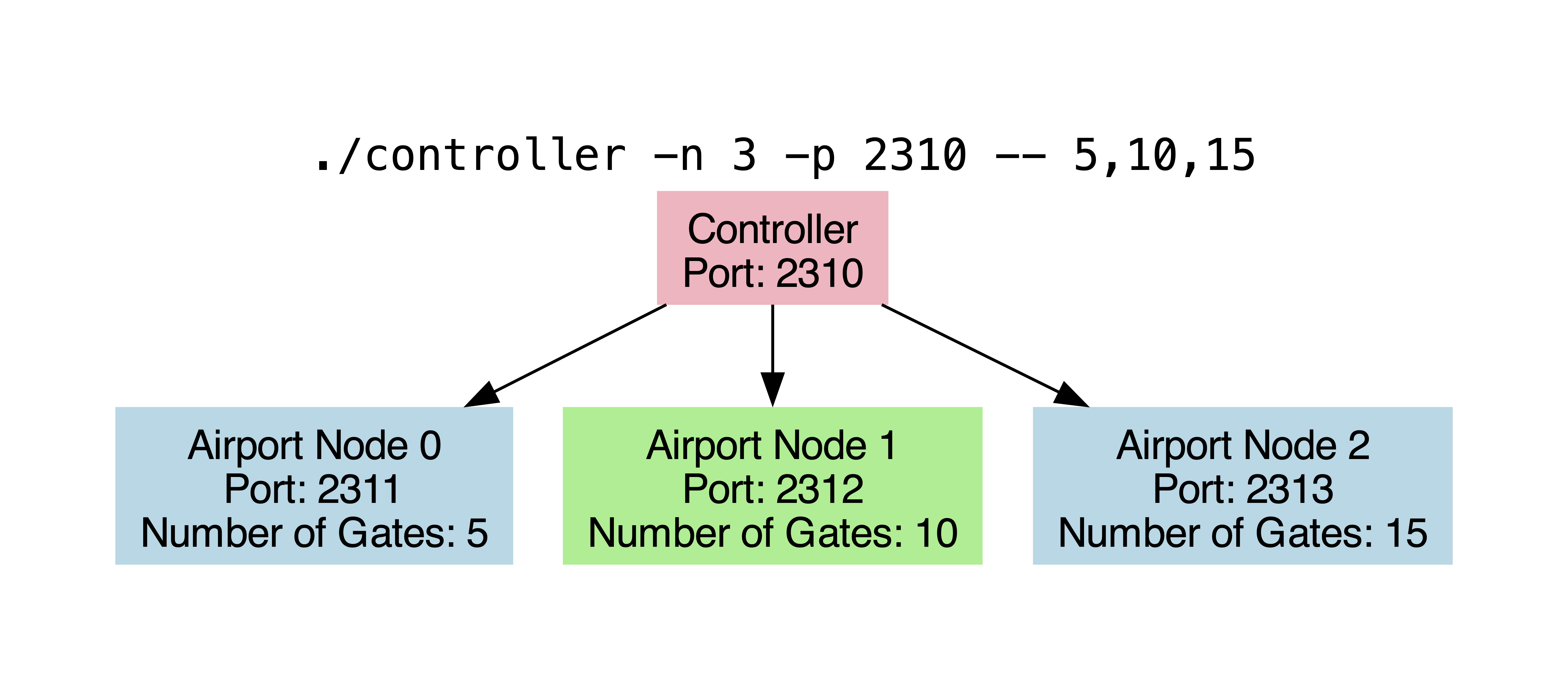
When the program is given a starting port S as an argument (set to 1024 by
default), it reserves the port numbers S+1 to S+N for the station nodes.
The controller will keep track of these port numbers to know where to forward
different requests.
Request & Response Formats#
The idea of processing a series of commands line by line should hopefully feel approachable and fun by now2!
It is a good idea to familiarise yourself with the provided structure definitions
in the station.h file that are used to represent stations, platforms and platform
schedules before attempting this assignment.
Time Slots and Indices#
To simplify the request format, we will specify time slots as indexes into an
array of time slots, each of which represents a 15-minute interval. For example,
a scheduling request with a starting time given as 5 represents the time 01:15.
Duration values are specified as integer values as well, representing a multiple of 15 minutes.
You may find the following diagram showing the correspondence between index values
into the time_slots array useful:
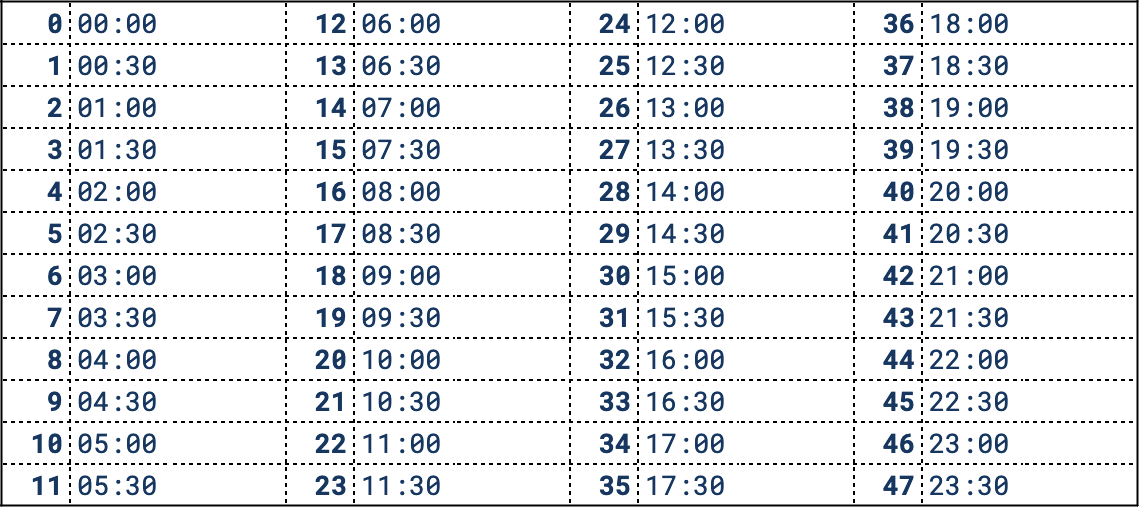
When responses are written as strings, they will need to be converted from these
integer values to HH:MM format. We have provided macros in the station.c
file to make this easy for you.
The way you would print the HH:MM value of a given idx in a call to printf
would look like this:
printf("%02d:%02d", IDX_TO_HOUR(idx), IDX_TO_MINS(idx));
Scheduling Requests#
In the following description of the request and response formats, anything that
appears between square brackets [like_this] indicates a ‘variable’ replaced
with a specific variable. The square brackets will not be present in the actual
request/response strings.
All response and request strings are assumed to be newline-terminated. A single space (“ “) between different components of the requests represent an arbitrary amount of whitespace.
The format of a request to assign a platform at a given station to a specific train is as follows:
// Format:
SCHEDULE [station_num] [train_id] [earliest_time] [extra_slots] [fuel]

// Example:
SCHEDULE 0             1001       4               5          8
The meaning of each of the values (all of which are 4-byte integers) is as follows:
station_num: The specific station to forward the request to (i.e. where the train wishes to arrive).train_id: The id number of the train that wishes to arrive at the given station.earliest_time: The index of the earliest time slot this train can arrive at.extra_slots: The number of subsequent slots the train will need to remain at the platform for. The train will depart the platform after this.fuel: The fuel value is the number of fifteen minutes intervals that, when added to the starting time, represents the time at which the train will run out of fuel.
The last three values of the request limit the times at which a train arrival can be
scheduled. Where the “start slot” S is the index at which an arrival is first
assigned, the following restrictions apply:
0 <= S < NUM_TIME_SLOTS: A train arrival must be scheduled within the bounds of the schedule.S+extra_slots < NUM_TIME_SLOTS: As we restrict our prototype to scheduling a single day we disallow a train remaining over midnight into the following day.S <= earliest_time+fuel: Arrivals must be scheduled (if possible) before the train runs out of fuel.S >= earliest_time: You cannot schedule an arrival earlier than its earliest possible arrival time.
In particular, a “fuel” value of 0 means that a train can only be placed
in the time slot specified by “earliest” in a platform, or not at all (we use this
fact for testing purposes).
For example, the above schedule request will allow for train 1001 to be placed
at any chunk of 6 adjacent free slots starting at any time between 01:00 and
03:00 (inclusive).
When scheduling a train to a platform, we do ask there is a minimum amount of time
where the platform must be empty in between two trains being there. The minimum number of
time slots the platform needs to be empty in between the scheduling of two trains is
defined in MIN_GAP_BETWEEN_TRAINS (and set to 1). This should mostly be handled automatically
for you in the assign_in_station function.
The format of the response depends on whether the arrival could be successfully scheduled or not. A successful response will be of the form:
SCHEDULED [train_id] at PLATFORM [platform_number]: [HH]:[MM]-[HH]:[MM]
With train_id and platform_number replaced with the train id and platform number
the two HH:MM values are times the train arrives at the platform, and the time the
train leaves.
For example, SCHEDULED 1001 at PLATFORM 0: 01:00-02:30\n is a possible response. (The train is allocated to a total of 6 time slots in this case).
(In the special case that a train is departing a platform at midnight, the second time should be 00:00).
As you are only scheduling the times at which trains are allowed to arrive and stay at platforms in stations for (and not the actual movement of the trains), you don’t need to worry about things such as:
- the same train being scheduled at two different stations at the same time (you may assume this never happens)
- where the trains go after departing a platform
An unsuccessful response will be of the form:
Error: Cannot schedule [train_id]
You will have to write the code to forward these requests, parse them correctly and build the response strings, but the code you are provided with includes functions to look for valid time slots to insert a train arrival into already.
The following is a graphical representation of what time slots the above example request could be placed in:
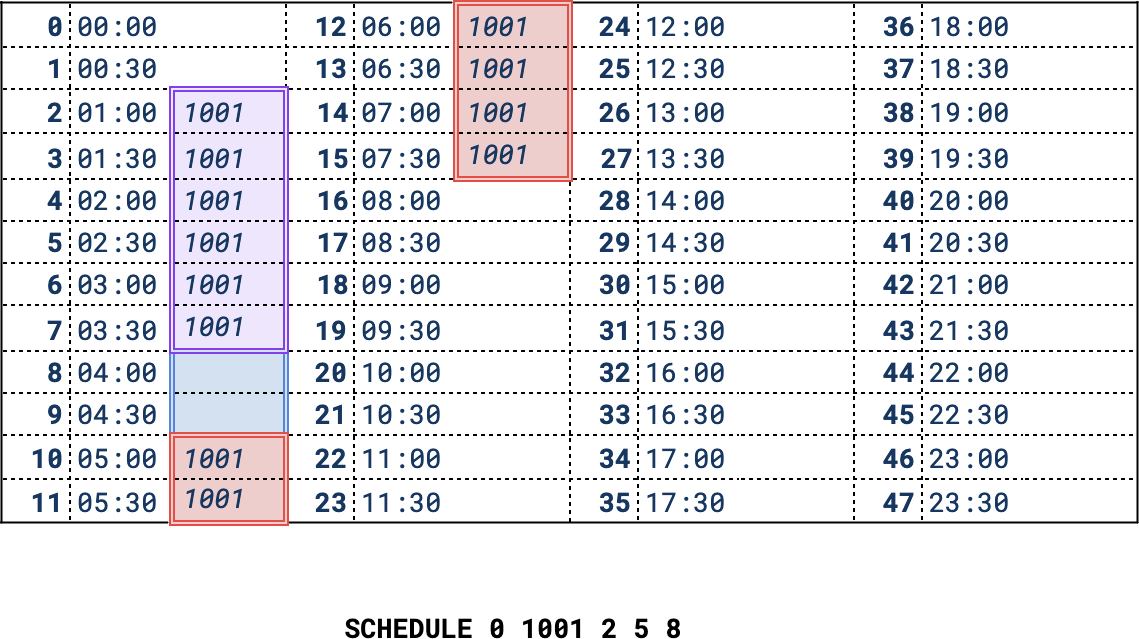
The earliest time slots the train may occupy are between 01:00 and 02:15
as determined by the starting time (shown in purple). The latest time slot that the train may first
arrive in is 03:00 (shown in red).
For testing purposes, we require that train arrivals are scheduled as early as possible and in the lowest platform number possible.
Arrival Lookup Requests#
Once we’ve scheduled arrival times for trains, it will be useful for other clients (or even people on their phones!) to be able to find out when we scheduled those trains to arrive. These requests will be in the following form:
TRAIN_STATUS [station_num] [train_id]
The meaning of each of the values (all of which are 4-byte integers) is as follows:
station_num: The specific station to forward the request to (i.e. where the train wishes to arrive).train_id: The id number of the train that the client wishes to look up.
These commands are processed by searching each platform in the station for time slots that are occupied by the given train.
A successful response, where the train was found in platform platform_num of the
station, will be in the following form. The two HH:MM values are the starting
and ending times for the specific train arrival. (i.e. when the train first arrives
at the platform, and when it is due to depart).
TRAIN [train_id] scheduled at PLATFORM [platform_num]: [HH]:[MM]-[HH]:[MM]
You can assume that a given train will not end up at the same platform at the same station multiple times in the day, and so you do not need to worry about this case. (But trains can appear on different platforms/stations!)
If there is no platform in which train_id is scheduled at the given station, the
response should be in the following form:
TRAIN [train_id] not scheduled at station [station_num]
Platform Information Requests#
The third request type required will allow clients to request information associated with a specific platform:
TIME_STATUS [station_num] [platform_num] [start_idx] [duration]
This will return the status of the slots between
[start_idx]..[start_idx+duration] (inclusive) in the given platform’s schedule.
The meaning of each of the values (all of which are 4-byte integers) is as follows:
station_num: The specific station to forward the request to.platform_num: The platform number to return scheduling information for.start_idx: The index of the starting time slot to return information for.duration: The number of subsequent time slots to include in the returned scheduling information.
The format of the response will follow the same format, for each time slot in
the range start_idx to start_idx+duration (inclusive).
STATION [station_num] PLATFORM [platform_num] [HH]:[MM]: [status] - [train_id]
STATION [station_num] PLATFORM [platform_num] [HH]:[MM]: [status] - [train_id]
...
STATION [station_num] PLATFORM [platform_num] [HH]:[MM]: [status] - [train_id]
The value of status should be either letter A for “allocated” (i.e. a train arrival is
assigned) and F for “free”. If the slot is free, the train_id should be
printed as the number 0.
When testing your server interactively, sending a request of the form
TIME_STATUS [station_num] [platform_num] 0 95 may aid in debugging, as it will
return the status of all time slots in the given platform’s schedule.
Forwarding Requests#
Your controller will need to implement a way of parsing requests in the above format. At the very least it needs to determine which station each individual request needs to be forwarded to before it can connect to the appropriate station port.
During initialisation, information associated with each station node subprocess
is stored in the global ATC_INFO structure. This include the port number
associated with each node. You can use this information to open a connection to
a station node’s listening socket.
In this assignment we leave it entirely up to you how you format requests that are forwarded from the controller to the station nodes (assume the requests behave correctly, of course). It is up to you to determine what is appropriate for your implementation, keeping in mind the requirements of the system as set out in the overview.
If this limitless freedom seems too open-ended to you, here are some ideas:
- You forward the request line with the station id stripped out, as it will be redundant information once forwarded to the correct station node.
- You retain the station id and forward the request verbatim. This may be helpful in determining whether requests are forwarded to the correct location.
- You perform pre-processing or parsing of the full request line before forwarding in a completely different format (such as sending binary data directly).
You need to be able to properly document and give valid justification as to the appropriateness of choice in your report.
Think about the aspects that would change as we scale the ATC network to a city-wide system. At scale, we will likely have many more users, and an increase in the physical distance between the controller and station nodes. This differs significantly from running everything one a single machine. What implications might this have? What bottlenecks could it introduce? And how can you design your forwarded requests to address this limitation?
Error Detection & Response Format#
Your implementation should gracefully handle possible errors that may arise from either network connection issues or invalid parameters included in requests.
Regardless of request type, if a request has an invalid station identifier provided, the controller should respond with a message of the form:
Error: Station [station_num] does not exist
An invalid platform number provided in request types in which this is relevant should respond in the following form:
Error: Invalid 'platform' value ([platform_value])
Other error conditions and their messages returned can be seen in the provided
test case basic-3.
Finally, in the case of either an invalid request type or invalid arguments passed, you should return a response of the following form, regardless of the specific cause:
Error: Invalid request provided
If you believe there are possible error messages that could be returned that are neither covered in this section nor included in the provided test cases, you are allowed to define the form of the specific error message returned to the client.
Concurrent ATC#
To make the ATC network blazingly fast, you will need to extend your implementation to be able to handle concurrent client connections. There are two main places where concurrency can be applied in this network - in the controller and in the station nodes.
Multi-Threaded Controller#
Once you have a working sequential controller that handles one client’s requests at a time, you should extend it to simultaneously handle multiple clients. The simplest way to implement a concurrent server is to spawn a new thread to handle each new connection request. However, this method creates a substantial amount of additional overhead by spawning a new thread for every single request. A better approach, and the one you should implement is to use a thread pool, where threads are spawned only once and will wait for work to be assigned.
- Note that your threads should run in detached mode to avoid memory leaks.
- The
open_clientfdandopen_listenfdfunctions described in the lectures (and included in the provided network utilities code) are based on the modern and protocol-independentgetaddrinfofunction, and thus are thread safe. - You should implement a shared queue to handle allocating
connfd’s to different threads. See Exercise 3 of Lab 9 for more details.
We expect all submissions to implement a multi-threaded controller, and make use of a thread pool.
Multi-Threaded Station Nodes#
The second part of the program to introduce multithreading into is the station nodes. You should now introduce the ability for an individual station to handle multiple forwarded requests at once. This should follow the same approach as for multi-threading in the controller node - distributing requests between different threads in a thread pool. Sounds simple enough!
Ensuring Thread Safety#
The most difficult (and therefore most interesting) part of this extension will be ensuring that accesses to the schedule are thread-safe! For example, suppose you had a completely empty schedule and were concurrently processing the following two requests from two different clients:
SCHEDULE 0 1001 0 2 3 // Client 1 requests to schedule the arrival of train 1001
SCHEDULE 0 1002 0 3 5 // Client 2 requests to schedule the arrival of train 1002
If you aren’t careful, processing these requests in different threads could result in both trains being assigned the same platform at the same time! What a trainwreck! You will need to limit access to the schedule to prevent race conditions from occurring.
There are a few approaches to this, with varying levels of effectiveness:
-
The easiest way (and one that will not be considered a valid attempt when marking your code) is to use a “global lock” on the entire station’s schedule each time a thread needs to read from or write to it. It should be fairly intuitive why this is inefficient.
-
A somewhat more efficient approach would be to use a locking scheme that allows for multiple threads to be able to read from the schedule simultaneously, and only allow one thread to write to the schedule.3
-
A better approach would be to have a more fine-grained locking scheme. Rather than locking the entire schedule, you only lock the schedule of the platform you are interested in.
Hint: This could be implemented by adding either a mutex or read-write lock to the
platform_tstruct, which must be acquired before accessing the time slots associated with that specific platform. -
An even better approach would be to allow locking specific time slots in the schedule. If you wish to check whether slots
[i]..[j]are free, you can associate a lock with each individual slot that must all be acquired
This last approach can be very difficult implement in a way that does not cause threads to deadlock. Think about what would could happen when two threads try to lock overlapping regions of the schedule.
Ordering Requirements#
After introducing multithreading to both the controller and station nodes, you may find that different requests will be processed in a (mostly) arbitrary order. So it doesn’t become too chaotic, we impose the following requirements on request ordering:
- Individual requests within a client connection must be processed in order.
- Requests from distinct clients can be ordered arbitrarily.
In regards to the first point, this means that if a client makes the following two requests in a single transaction:
1. SCHEDULE 1 1234 0 1 2
2. TRAIN_STATUS 1 1234
The first request to schedule a platform for the arrival of train 1234 needs to be
processed (i.e. added to the schedule) before the second request for its associated
arrival information.
If these two requests were made by separate client connections however, we impose no restrictions on whether one is processed before the other.
The easiest way to follow these consistency requirements is to ensure that the the response returned by a station node is written back to the client before processing further requests.
We could weaken the first requirement to be “individual requests within a client connection to the same station must be processed in order”, as the updates on different stations have no effect on each other.
You might wish introduce some finer grained control over work division on the controller-side to essentially “filter” each individual request to the different station nodes, but this is not something we require.
Testing#
There are two ways to run the ATC Network you have build: either interactively, or from a provided testing script.
Running Interactively#
The arguments accepted by the controller program are of the following form:
./controller -n NUM_STATIONS -p STARTING_PORT -- [platform count list...]
All argument parsing code has been provided for you already.
Testing Script#
The tests will likely not work if you are using Windows due to DOS line endings.
Run the command find tests -type f -print0 | xargs -0 dos2unix -- as well as
dos2unix -f run_tests.sh and dos2unix send_requests.sh to convert all the
scripts and testing files to use Unix line endings.
We have also provided a testing script for your code. This will automatically
run several tests against your code. The testing script launches the network and
uses netcat sessions to send different queries to the controller node.
It will capture the response sent from the controller, and then checks the
responses against an expected file.
We provide the following options to control the behaviour of the testing script:
| Option | Behaviour |
|---|---|
-h |
Display usage information and exit. |
-t test |
Run only one test (test is the name of the test to run). |
-v |
Print the contents of stdout and stderr when running tests. |
-n |
Disable color in the testing script output. |
Due to limitations of the testing script (which only works if the output of the test case is deterministic), you may find the test cases provided are not particularly useful in verifying the correctness of multi-threaded station nodes.
This is because the resulting schedule produces when handling requests concurrently may be placed in different slots on repeated runs of the test case.
You are encouraged to implement your own test cases and/or testing framework to validate your code. This could include:
- Writing your own testing script4 that checks whether the time slot(s) that a train arrival is allocated are within the correct range of possible times.
- Modifying the
Makefileto compile a program that tests individual function(s) directly, rather than through launching thecontrollerprogram.
Whatever approach you take, include it in your assignment submission and discuss in the testing section of your report.
Benchmarking#
In your report, we want to see you include benchmarking to support your decisions and analysis. To assist you with this, we’ve set up a benchmark program that you can run by calling:
./run_benchmark.sh
This will compile and run the bench.c file in the repo. There are three different benchmark stages it runs, to try test different scenarios and test different parts of your program.
If you’re using the benchmark, you are encouraged to read it and understand what it is doing, and to consider the relevance or shortcomings of it.
The benchmark is very sensitive to other activity on your computer, so we highly recommend stopping other programs, and running the benchmark a couple of times to ensure the results you’re getting are consistent.
If you’re unhappy with the benchmark program and wish it were better, you are welcome to modify it or write your own new benchmarking program. If you do so, make sure to briefly outline your new benchmark program in your report, in the overview or when discussing benchmark results.
Report#
As with Assignment 1, you are required to include a report that explains the
details of your implementation. It should be written in the given report.md
file as valid markdown and split up into the following sections.
In Assignment 2 the report is worth 60% of your mark!
You should invest time into writing a good report, and write it as you are implementing your code. You are going to have a bad time if you leave the report until an hour before the deadline.
The sophistication, quality, depth and correctness of your report and its analysis/justifications will determine your report mark.
Some of these will be omitted if you did not complete those specific optimisations:
- Overview of your train traffic control network. (max 200 words)
- You should make it clear what extension tasks you have attempted in this Overview section, but leave the important details until the relevant section later.
- You should include a high level explanation of how your controller node parses client requests, forwards them to the correct station node and returns the correct response.
- Request Format (max 400 words)
- Include an explanation of the format you decided to use when forwarding requests from the controller node to individual station nodes.
- Fully justify your decision, keeping in mind what is required of the ATC. To justify your decision, you should:
- Provide analysis of relevant benefits and tradeoffs of your chosen request format
- Compare and evaluate your chosen format against an alternative request format
- Use benchmarking evidence to support your reasoning and choice of request format
- Controller Concurrency (max 250 words)
- Go into more detail about how you implemented your controller concurrency and what effect, (if any) it had on the performance of your network. You should consider:
- How did you implement a thread pool / shared buffer?
- How did you decide on the number of threads to use?
- (Your response should be well justified and show benchmarking evidence)
- Did introducing concurrency to your controller improve benchmark performance? Why?
- Go into more detail about how you implemented your controller concurrency and what effect, (if any) it had on the performance of your network. You should consider:
- Station Concurrency (CR level and above) (max 400 words)
- Similarly, you should go over your station concurrency implementation. You should consider:
- How did you implement a thread pool / shared buffer? How did you decide on the number of threads to use? 5
- How do you protect accesses to the schedule within a station node? How did you implement your locking scheme? How do you ensure your locking scheme does not cause deadlocks or other issues?
- Did introducing concurrency to your station improve benchmark performance? Why?
- Similarly, you should go over your station concurrency implementation. You should consider:
- Further Anaylsis (D level and above) (max 400 words)
- To go further in your report, you can provide relevant, insightful analysis on one these topics:
- Where do you think is the bottleneck in your code? Are there ways you can verify it? How might this bottleneck be reduced?
- Is the level of locking implemented necessary for the current scale of the system? How do you expect this system perform when the number of requests, or stations, is scaled to up 10x or 100x? What might need changing?
- If you have other insights, thoughtful analysis, etc. you may include it here (keeping in mind the report should be concise)
- To go further in your report, you can provide relevant, insightful analysis on one these topics:
- Testing: (max 200 words)
- You should include at least one of the following, making sure to include specific details:
- Explanation of an implementation challenge encountered in completing this assignment. This could include a difficult bug you faced or a conceptual problem you got stuck on.
- Explanation of additional tests you created to verify your implementation.
- If there are any known bugs in your implementation, list them here in this section.
- Tip: choose one of the above, and explain it in detail, using specifics
- You should include at least one of the following, making sure to include specific details:
If used well, diagrams can be a useful way to help explain certain topics (e.g. data structures, request formats, etc.) in fewer words.
But don’t just include diagram(s) without any written explanation!
Each time we ask for benchmarking evidence, don’t have to give paragraphs of information - you can be concise. (Benchmarking data should be included throughout different sections of your report).
e.g. The … benchmark ran in X seconds before introducting concurrency. After I implemented Y, it ran in Z, a W% increase. This supports/contradicts …
e.g. I tried options X, Y and Z, which gave timings under benchmark … of A, B, C seconds respectively. This shows… This is beacuse… Therefore, …
Marking#
The code is worth 40% of your grade. The report is worth 60% of your grade.
Keep in mind that just attempting the given tasks for a grade band is not enough to guarantee you receive a final mark in that grade band. Things like the correctness of your implementation, report quality and code style will all influence your results. This is just provided as a guideline.
As with assignment 1, code style will still contribute a small amount to your code mark. This includes (but is not limited to):
- Having clear names for functions and variables
- Having comments explaining what more complex functions do
- Removing any commented out code before submission
- Removing excessive whitespace
- Avoiding leaving an excessive amount of
printfstatements in your code
See the below list for what might achieve each level of code mark:
- Pass: A correct implementation of a network with a concurrent controller server and sequential station nodes.
- Credit: A correct implementation of a network with a concurrent controller and concurrent station nodes with a “basic” locking scheme to protect accesses and modifications to the schedule.
- Distinction: A correct credit implementation, but with a fine-grained per-platform locking scheme instead.
- High Distinction: A correct credit implementation, but with a fine-grained per-timeslot (or per- several) locking scheme instead.
The sophistication, quality, depth and correctness of your report and its analysis/justifications will determine your report mark.
See the below list for what might achieve each level of report mark. The previous section outlines in more detail what we expect of your report, so make sure you’ve read it!.
- Pass: A well written report, containing:
- an overview,
- your request format with justification and benchmarking,
- explanation, justification and benchmarking your implementation of the concurrent controller,
- testing
- Credit to Distinction: In addition to the pass requirements, add:
- explanation, justification and benchmarking your implementation of the concurrent stations,
- Distinction to High Distinction: In addition to the all of the above requirements, add:
- further discussion on bottlenecks, scalability implications, etc.
Hints, Tips & Tricks#
Debugging Advice#
- Use assertions in your program, especially in the early stages of development.
-
You may find it useful to connect to an individual station node via
netcat(or some other tool) directly.When you launch the controller on port
X, station node0is assignedX+1, node1is assignedX+1and so on. You will be able to connect to station 0 with netcat by running the commandnc localhost X+1, for example. - If you are trying to debug individual station nodes crashing, you may find it
useful to modify the
sigchld_handlerhandler provided incontroller.cto report on the reason for specific nodes exiting.
Help! I’m X weeks behind in this course and have no idea what is going on!#
If you want to quickly catch up on the necessary content to complete this assignment, you can use the following guideline of which labs and lectures we recommend completing to understand the tasks associated with each grade band:
- Pass: Lab 9 and the lectures on building concurrent servers
- Credit: Lab 10 and the lectures on synchronisation issues in concurrent programs.
- Distinction and above: Lab 10 and lectures up to week 12.
Frequently Asked Questions#
My code doesn’t work, can I email you for help?#
Sorry, you won’t get help over email or Teams. Please ask your questions on Ed, which is the only way we are able to help outside of labs.
Forum posts related to your assessment submission must be “private” if they contain code or other sensitive information (as for any individual assessment task).
It’s [5 minutes, 60 minutes, 12 hours] before the deadline and my CI Jobs aren’t finishing!#
Unfortunately on the day that an assessment is due, when many students are pushing updates at once, the CI servers can’t keep up. You may not see your CI jobs finish before the deadline. You will just have to manually check that your files have been submitted correctly and that you are passing tests locally.
The best way to avoid this issue is to start early and finish early 😇
If there’s any issues with your git repository, please let us know through a private forum post and there may be something we can do.
How do I know my assessment has been submitted?#
If:
- the files in your fork of the assessment are correct (i.e., the files you intend to submit) when checking on the gitlab website
- the time is before the deadline
then your assessment has been submitted (well done!).
Please don’t ask us to “check”, we would be just doing exactly the same thing as the above steps which you can do yourself.
-
You can also assume that the union and state government have sorted out their differences, and that there will be no strikes or other industrial action on this day. It’s been a while since I’ve heard about it in the news… so maybe all is well..? ↩
-
If not, this is the last time you will need to do it in this course, at least! ↩
-
Hint: You should use read/write locks. ↩
-
You may use a different programming language to implement this if it makes the task simpler. ↩
-
The answers to some of these questions may overlap significantly with your implementation of multithreading in the controller node. In that case, say so (and why it is still applicable for the station concurrency), and focus more on answering the other questions under this part. ↩