Outline
In this lab you will:
- investigate (briefly) the concept of cellular automata (and revisit fractals)
- plan your project - including
- write your final interpretation of the theme
- write a list of tasks which need to be completed for you to reach your goal
- write a schedule of work (what you will commit to do each week) assigning tasks to a timeline
- start on the tasks
Introduction
We will continue working on your Final Project!
You can find all the details about the final project assessment task by visiting the final project deliverables page.
You can find the template repository for your final project submission here.
The theme for the final project this year is “… endings … beginnings …“.
But first, let’s have a quick look at Cellular Automata and revisit Fractals!
Part 1: Cellular Automata
Part 1A: Revisiting Fractals from Lab 21
Here’s a Romanesco Broccoli spotted in Canberra over the weekend (fractals in the wild):

Follow the demonstration. Try some changes.
ASIDE: to get the updated content for lab 21 you can pull from the upstream (parent) repository as shown here:
# add an upstream reference
git remote add upstream https://gitlab.cecs.anu.edu.au/extn1019/2024-2025/year-12/extn1019-2025-year-12-lab-21
# verify the upstream
git remote -v
# fetch from upstream
git fetch upstream
# pull from upstream
git pull upstream main
if you have changes that you wish to discard (to simplify a merge) you can reset hard
git reset --hard
DO: Fork and clone (or update from upstream) the lab 21 template repo.
DO: Think about how you might change this system. The Mandelbrot function? Colour mapping? User interface? Write down a few ideas.
Cellular Automata
Cellular Automata are: a grid of cells, each in one of a finite number of states, such as on and off. The grid can be in any finite number of dimensions. Each cell of the grid has a set of cells called its neighborhood. An initial state (time t = 0) is selected by assigning a state for each cell. A new generation is created (advancing t by 1), according to some fixed rule (generally, a mathematical function) that determines the new state of each cell in terms of the current state of the cell and the states of the cells in its neighborhood. Typically, the rule for updating the state of cells is the same for each cell and does not change over time, and is applied to the whole grid simultaneously, though exceptions are known, such as the stochastic cellular automaton and asynchronous cellular automaton
Automata can be one-dimensional, two-dimensional or defined by higher dimensions.
Stephen Wolfram investigated automata in detail in the book A New Kind of Science in 2002.
Automata patterns can also be observed in nature:
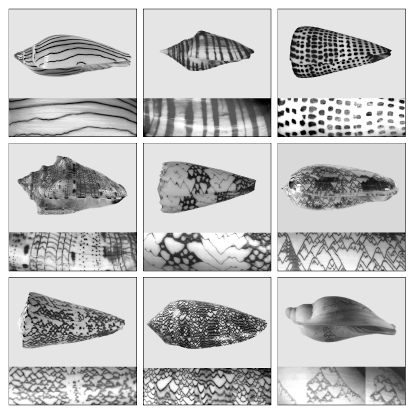
(From Cellular Automata and Computing)
DO: Fork and clone the lab template repo.
We will look at:
- how Conway’s Game of Life works (see the Coding Train Challenge)
- Interface design
- Further Ideas
Follow the live demonstration and Q&A session with your instructor.
Part 2: Planning
This will be completed offline following your instructors prompts. For those who are not physically present in class, here’s a run-through of what we will do:
- disconnect from all internet connected devices and all electronic user interfaces
- grab a notepad and pencil (yes, pencil is preferred)
- answer the questions:
- what is your final interpretation of the theme?
- how will this look/sound like in an artwork?
- how will users interact with the artwork (or how will it evolve over time)?
- how will the interaction/evolution strengthen your communication of the theme?
Now that you have completed your ideation and first part of your designs, let’s think about planning out the tasks:
- list the tasks required to develop your project:
- you need a sketch which generates your art
- you need an
interpretation.mdwhich describes your artwork for an audience - you need a
README.mdwhich describes how to interact with your artwork - you need your project documentation (read the spec)
- your code will need to be tested, and refined
- you can break your coding tasks down into simpler elements
- we have 6 weeks remaining. Map the tasks to weeks.
Some tasks may take more than 1 week.
OK – Great work. Now we can go back online.
If you haven’t already, fork and clone the final project repo.
Checking In
You should now have:
- an interpretation of the theme to work with
- some ideas for how this will work in code
- some ideas for interacting with your artwork
- a list of tasks you need to complete
- a mapping of tasks to dates
This is not just in your head. You have solid project documentation.
Make sure you add this evidence (even as photos of handwritten notes) to your repository.
Getting down to business
Now you have the required elements for your project - it is time to get to work.
Your instructor will be asking about your plan, your tasks, and help you resolve any issues.
Be sure to commit and push your work to gitlab.
Summary
Congratulations! In this lab you:
- looked at fractals and cellular automaton
- read through the final project deliverables page
- finalised your interpretation of the theme and the representation of this interpretation
- planned out the tasks required to complete your project
- worked on some of the tasks for your project
Before you leave class today, make sure you commit and push your work to GitLab.